- 1. Introduction
-
2. Usage of Addo API
- 2.1. Limitations
- 2.2. REST via Postman
-
2.3. Public methods
- 2.3.1. Login
- 2.3.2. InitiateSigning
- 2.3.3. GenerateDocument (obsolete)
- 2.3.4. GetSigningTemplates
- 2.3.5. GetSigning
- 2.3.6. GetSigningStatus - Obsolete
- 2.3.7. StartCampaignSigning
- 2.3.8. MergeDocuments
- 2.3.9. InitiateCampaign
- 2.3.10. GetAccountInfo
- 2.3.11. GenerateDocumentWithMergeData
- 2.3.12. GetTransactionDetails
- 2.3.13. ReactivateTransaction
- 2.3.14. CancelTransaction (obsolete)
- 2.3.15. UpdateTransaction
- 2.3.16. SaveRecipient
- 2.3.17. DeleteRecipient
- 2.3.18. ExportRecipients
- 2.3.19. ImportRecipients
- 2.3.20. GetCampaigns
- 2.3.21. GetTemplateMessages
- 2.3.22. GetRejectionComment
- 2.3.23. CreateGroup
- 2.3.24. GetGroups
- 2.3.25. CreateUser
- 2.3.26. AddUserToGroup
- 2.3.27. CancelSigning
- 2.3.28. CreateAccount (secured)
- 2.3.29. GetSignings
- 2.3.30. RefreshToken
- 2.3.31. Logout
- 2.3.32. GetSecureTransferTemplates
- 2.3.33. InitiateSecureTransfer
- 2.3.34. GetTransactionToken
- 2.3.35. GetSigningWithoutDocuments
- 2.3.36. GetAccounts
- 2.3.37. GetAccountCreditsUsage
- 2.3.38. CalculateCompletedSigningsCount (paired with GetCompletedSigningsCount)
- 2.3.39. GetCompletedSigningsCount
- 2.3.40. GetFormTemplates
- 2.3.41. GetFormTemplate
- 2.3.42 GetFormResponse
- 2.3.43. InitiateFormSigning
- 2.3.44. UpdateSigningExpirationDate
- 2.3.45. ImportFormTemplate
- 2.3.46. ExportFormTemplate
- 2.3.47. GenerateDocumentWithMergeData
- 2.3.48. GetFormSigningTemplates
- 2.3.49. GetFormFile
- 2.3.50. GenerateDocument
- 2.3.51. CreateSigningTemplate (BETA)
- 2.3.52. GetFormFileBase64
- 2.3.53. GetSigningBase64
- 3. Custom extensions
- 3.1 InitiateJSONFormSigning
- 3.2 GetJSONFormResponse
- 3.3 InitiateCollectionSigning
- 3.4 CancelCollectionSigning
- 4. Security
- 5. Notes
1. Introduction
1.1. Purpose
This document describes Addo Web Service and explains how to consume it.
1.2. Allowed HTTPs requests
POST - used to update resource and GET - used to get a resource or list of resources
1.3. Description of server responses
200 OK - the request was successful (some API calls may return 201 instead).
400 Bad Request - the request could not be understood or was missing required parameters.
401 Unauthorized - authentication failed or user doesn't have permissions for requested operation.
500 Internal Server Error - server encountered an unexpected condition that prevented it from fulfilling the request.
2. Usage of Addo API
2.1. Limitations
In order to allow a healthy operation of our API service, there is are some limits of requests per time span:
- 1500 requests per 1 minute
- 5000 requests per 1 hour
- 48000 requests per 24 hours
These numbers were calculated by historic usage of API as a sane limit that no typical user reaches and that it doesn't bring heavy work load for the servers. If for any reason you do reach this limit, please review your integration, maybe there is a way to improve and reduce the number of calls made. For example make sure no duplicate calls are made, you are using callbacks instead of periodically checking signing status, or not calling login method every second request, but use refresh token when it's about to expire (10 minutes from last call).
If for some reason you break the limits you will get a 429 status code back on your requests.
2.2. REST via Postman
Download Postman tool via link - https://www.getpostman.com/apps
To get your hash for password, use tools like this one: https://hash.online-convert.com/sha512-generator. Select base64 for your password hash,
Request usage:
POST - [Base address]/[Public method name]
GET - [Base address]/[Public method name]?[Parameters]
2.2.1. POST request via Postman
Using Postman:
To login using REST service you need to call
web service at address:
https://demo.addosign.net/WebService/v2.0/restsigningservice.svc/login
Use method POST and set content-type as application/json.
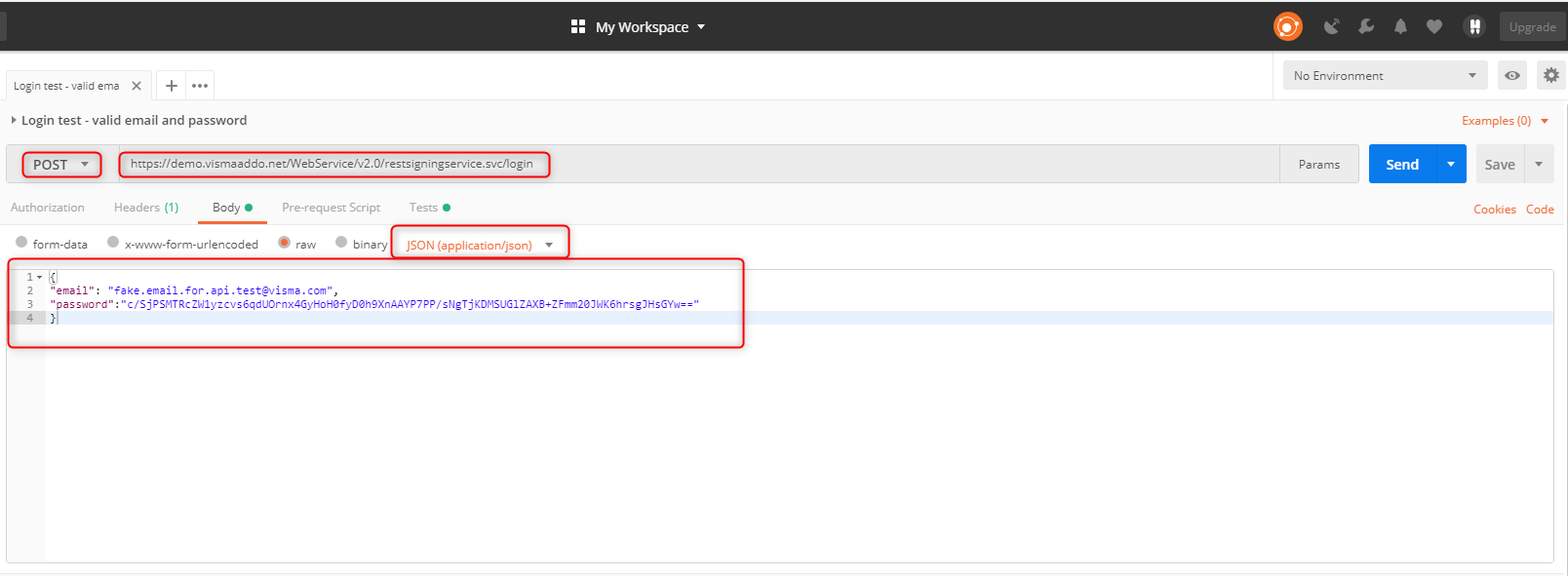
Code used here:
{ "email": "fake.email.for.api.test@twoday.com", "password":"c/SjPSMTRcZW1yzcvs6qdUOrnx4GyHoH0fyD0h9XnAAYP7PP/sNgTjKDMSUGlZAXB+ZFmm20JWK6hrsgJHsGYw==" }
Below is a screenshot of POST
request and response as described
above:

Server response of correct login is visible at the bottom with string in the body of token and 200 OK status
2.2.2. GET request via Postman
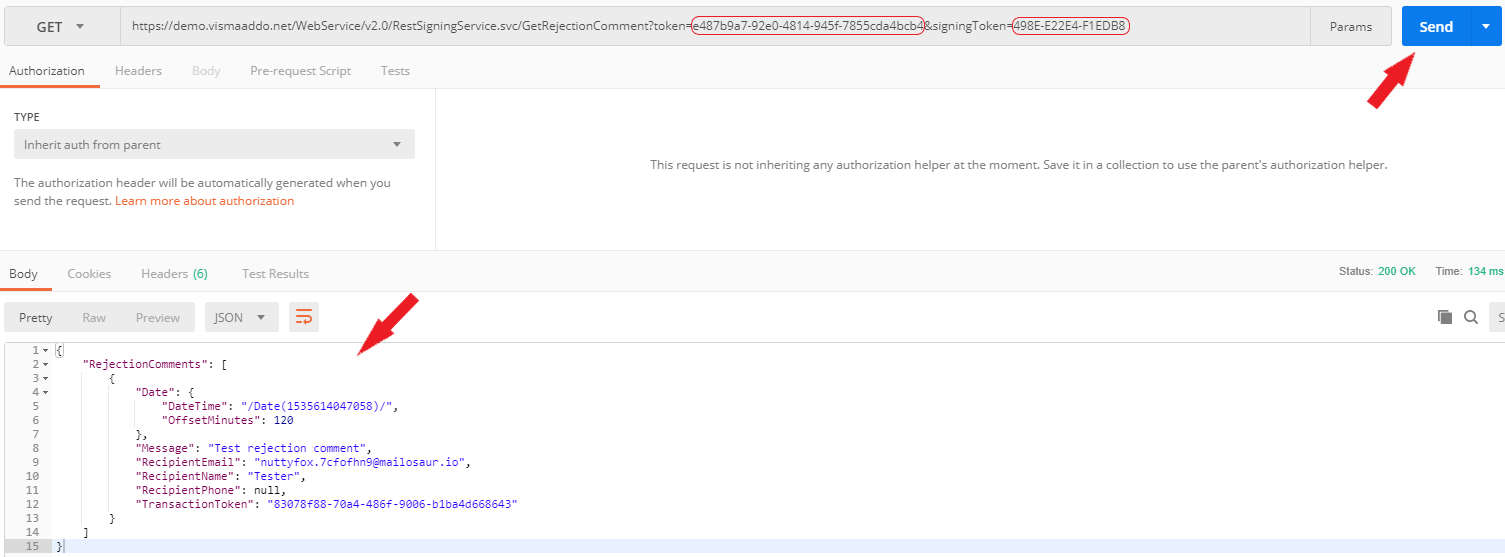
Here is an example of a method with GET request, showing how parameters are passed through URL.
In Postman, we are using GetRejectionComment method. This requires us to pass signingToken and token parameters.
You can get the token after using POST for login example in previous paragraph, it's available in the response field "Body":
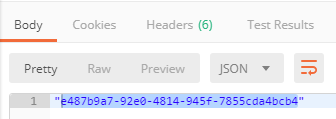
GetSigningStatus or GetSigning responses contains signing token.
Now we pass these parameters as a link in Postman and receive a response:
2.3. Public methods
There are currently two Demo and Production environments, which might differ in variety of supported methods.
Base address for the service:
DEMO - https://demo.addosign.net/WebService/v2.0/RestSigningService.svc
PRODUCTION - https://addosign.net/WebService/v2.0/RestSigningService.svc
Health Check:
DEMO - https://demo.addosign.net/WebService/v2.0/RestSigningService.svc/healthcheck
PRODUCTION - https://addosign.net/WebService/v2.0/RestSigningService.svc/healthcheck
2.3.1. Login
Technical description
- A service consumer must call the Login method prior to any other operation.
- The credentials provided to the Login method must match a valid Addo user email and password as strings.
- In case of success the Login method will return a valid security token (type of Guid) that must be supplied subsequently in calls to the service methods.
- In case of authentication failure the Login method will return empty invalid security token (type of Guid).
- If email or password strings are null the service will throw a FaultException.
- If password is expired or account is disabled appropriate FaultException will be thrown.
- The token received on successful login is valid for a given time (00:05:00).
- Each time the token is used in an operation on the service this valid time window is refreshed.
Parameters
| Name | Type | Description |
|---|---|---|
| string | Email of Addo user | |
| password | string |
User's password |
Example
| Request | Response |
|---|---|
|
{ "email":
"fake.email.for.api.test@twoday.com", |
77d7f36e-3a90-462f-8d61-ee2b8a1f408d |
2.3.2. InitiateSigning
Technical description
This method initiates a new Addo signing process.
An InitiateSigningRequest object must be supplied containing data must be supplied containing information needed for about how to create the signing along with a full signing dataset describing participating customers and their data.
The request also specifies signing template id which will be used while configuring signing.
Parameters
| Name | Type | Description |
|---|---|---|
|
token |
Guid |
User token, necessary for identification. |
|
request |
InitiateSigningRequest |
Contains data about how to create signing. |
|
templateOverride |
TemplateOverride |
Optional. Used in order to replace default account configuration presets (last reminder, signing method etc.). |
Response
Method gives response (type of InitiateSigningResponse). Information if signing failed being initiated could be found there.
Types
| Type | Description |
|---|---|
|
Guid |
A unique set of symbols, necessary for identification. |
|
InitiateSigningResponse |
Information if signing failed being initiated could be found there. Contains property: SigningToken (type of string). |
|
InitiateSigningRequest |
Contains properties: Name (type of string) to set signing name, StartDate (type of DateTime) to set starting date, SigningData (type of Signing) to set required parameters regarding documents, recipients, enclosures and signing sequence when initiating new signing, SigningTemplateId(type of Guid), DistributionUrl (type of string) to set callback url when signing is completed, RejectionUrl (type of string) to set callback url when signing is rejected, ExpirationUrl (type of string) to set callback url when signing expires, DocumentSignedUrl (type of string) to set callback url when documents are signed, TransactionStateChangedUrl (type of string) to set callback url for all transaction state changes. |
|
TemplateOverride |
Contains properties: Duration (type of TimeSpan), MessageTypes (array of MessageTypeEnum), NotificationInterval (type of NotificationIntervalEnum), LastReminder (type of LastReminderEnum), SigningMethod (type of SigningMethodEnum), DocumentEncryption (type of DocumentEncryptionEnum), ShowSignerName (type of bool), ShowDate (type of bool) and CustomMessageTemplates (array of MessageTemplate), AuthenticationMethod (type of AuthenticationMethod), NotificationIntervalDays (type of int), SignWithOneKey (type of bool) |
|
MessageTemplate |
Used for sending customized messages (overrides default messages) for recipients. Contains properties: UsageType (type of TemplateUsageType), Subject (type of string) used for email and Body (type of string) used for email or sms message. |
|
Signing |
Contains properties: Recipients (array of RecipientData) to define recients' data such as name, phone etc., Sender allows you to have sender name, email and company name other than your account name (type of SenderData) Documents (array of Document) to use these pregenerated documents if it is necessary while initiating signing, EnclosureDocuments (array of Document), SigningSequence (type of SigningSequenceOrder), ReferenceNumber (type of string), Sender (type of SenderData), SenderComment (type of string), AllowInboundEnclosures (type of bool), AllowRecipientComment (type of bool), ExternalReferenceId (type of string), AdditionalData (type of string). |
|
RecipientData |
Information about the recipient. Contains properties: Id (type of Guid) relates to SigningSequence, Cpr (type of string), Name (type of string), PID (type of string), Address (type of string), Email (type of string), Phone (type of string), CVR (type of string), SSN ([deprecated] type of string), SwedishSsn (type of string), NorwegianSsn (type of string), TupasSsn (type of string), TemplateData (type of TemplateDataContainer), SendWelcomeNotification (type bool?, true by default) which sets whether invitation mail/sms has to be sent to a recipient, SendDistributionNotification (type of bool?, true by default) which sets whether distribution mail/sms has to be sent to a recipient, SendDistributionDocument (type of bool?, true by default) which sets whether a receipt massage should include documents, SigningMethod (type of SigningMethodEnum?, if not set inherited from signing template), AuthenticationMethod (type of AuthenticationMethodEnum?, if not set inherited from signing template), Title (type of string), DistributionMethod (type of DistributionMethodEnum?, setting if recipient will get documents and how it will be sent), RecipientSignaturePlacements (type of RecipientSignaturePlacement array). |
|
SenderData |
Information about the
sender. |
|
Document |
Contains properties: Id (type of Guid) relates to SigningSequence, Data (type of string) which is encoded as base64 string, Name (type of string), MimeType (type of string), AdditionalData (type of string). |
|
SequenceOrder |
Defines order how the documents will be signed by recipients. Contains property: SigningSequenceItems (array of SequenceItem). |
|
SequenceItem |
States sequence number for a recipient. Contains properties: RecipientId (type of Guid) and SequenceNumber (type of int). |
|
TemplateDataContainer |
Used for pdf generation using XSLT templates. Contains property Items (list of TemplateDataItem). |
|
TemplateDataItem |
Represents XML. Contains properties: Name (type of string) which represents XML tag name, Value (type of string) which represents value inside that element and Items (list of TemplateDataItem) which contains nesting XML elements. |
|
MessageTemplateType |
OBSOLETE. Can have values: Sms (1), Email (2). Sms is no longer used, so all messages goes for Email type, No need to use it. |
|
TemplateUsageType |
Describes for what purpose the template message will be used. Can have values: StartMessage (0), RemindMessage(1), Distribution (4), CampaignStartMessage(5), CampaignRemindMessage(6), ApproveMessage(7), ApproveReminderMessage(8), SigningPortalReceiptText(9) |
|
MessageTypeEnum |
Can have values: None (0), Mail (1), SMS (2), Eboks (3) (used for e-Boks private), EboksCompany (5). Describes on which channel the campaign will send out messages to a recipient. |
|
SigningMethodEnum |
Can have values: Touch (2), Norwegian BankID (3), NemIDMoces (4), Swedish BankID (5), Accept (6), FTN (9), Siths (10), Approve (11), Freja (13), Efos (14), MitID Private (15), eIDAS (16), Freja Org ID (19), Freja+ (20), MitID Erhverv (21). Describes how the documents of the signing must be signed. |
|
NotificationIntervalEnum |
Can have values: DontSend (1), EveryWeek (2), EveryTwoWeeks (3), EveryThreeWeeks (4). Describes the frequency with which the campaign will send out notifications to its recipients. |
|
LastReminderEnum |
Can have values: DontSend (1), DayBefore (2), TwoDaysBefore (3). Describes when to send out last reminder to recipients of the signing. |
|
DocumentEncryptionEnum |
Can have values: None (1), Encrypted (2), Passcode (3). Specifies whether encryption is enabled for signing documents when distributing. |
|
AuthenticationMethodEnum |
Can have value: None (0), TwoFactorVerification(3), Siths(4), Efos (5), NorwegianBankId(8), SwedishBankId(9), NorwegianBankIdMobile(10), SecretCode(11), FTN (13), Freja(14), eIDAS (17), MitID Private (18), Freja Org ID (19), Freja+ (20), MitID Erhverv (21). Specifies which method should use on authentication before signing documents. |
| DistributionMethodEnum |
Can have value: None (1), MessageWithDocuments (2), MessageWithoutDocuments (3) Eboks (4) |
| Callback |
Information about callback: Url (type of string) Type (type of CallbackTypeEnum) |
| CallbackTypeEnum | Can have values: Completed (1), Expiration (2), Rejection (3), DocumentOpened (4), DocumentSigned (5), TransactionStateChanged (6), Redirect (7), Invitation (8), Reminder (9), BouncedDelivery (10), Cancelled (11) |
Properties of the types
| Type | Property | Type | Description |
|---|---|---|---|
| InitiateSigningResponse | SigningToken | string | Token of signing, unique identification. |
|
InitiateSigningRequest |
Name |
string |
Defines name of a signing. Mandatory, Max 100 chars. |
|
StartDate |
DateTime |
Defines when a signing will start. StartDate value cannot be 24 hours before request is created. Mandatory. Uses UNIX date format like "/Date(1573638173002)/" | |
|
SigningData |
Signing |
Contains data about signing. | |
|
SigningTemplateId |
Guid |
Defines a Guid which is associated with a template settings of a signing (duration, message type, notification interval, signing method etc.). | |
|
DistributionUrl (obsolete) |
string |
Distribution callback url. On distribution for the provided url it will add query string parameter "signingToken" | |
|
RejectionUrl (obsolete) |
string |
Rejection callback url. On rejection for the provided url it will add query string parameter "signingToken" | |
|
ExpirationUrl (obsolete) |
string |
Expiration callback url. On expiration for the provided url it will add query string parameter "signingToken" | |
| DocumentSignedUrl (obsolete) |
string |
Document signed callback url. On document signed for the provided url it will add query string parameters "signingToken", "transactionToken", "externalDocumentId" | |
| DocumentOpenedUrl (obsolete) | string | Document opened callback url. On document opened for the provided url it will add query string parameters "signingToken", "transactionToken", "externalDocumentId" | |
|
TransactionStateChangedUrl |
string |
Transaction state changed callback url. On transaction state change for the provided url it will add query string parameters "signingToken", "transactionToken", "referenceNumber", "transactionStateId" | |
| Callbacks | Callback[] | An array of callbacks. Explicit properties of the callbacks are obsolete. | |
|
TemplateOverride |
Duration | TimeSpan? | Describes life time of the signing, must be longer than a day. Please see below in section 5 (Notes). |
| MessageTypes | MessageTypeEnum[] | Describes on which channel the signing will send out messages to a recipient: Mail (1) and/or SMS (2). | |
| NotificationInterval | NotificationIntervalEnum? | Describes the frequency with which the signing will send out notifications to its recipient: DontSend (1), EveryWeek (2), EveryTwoWeeks (3), EveryThreeWeeks (4). | |
| LastReminder | LastReminderEnum? | Describes when to send out last reminder to recipients of the signing: DontSend (1), DayBefore (2), TwoDaysBefore (3). | |
| SigningMethod | SigningMethodEnum? | Describes how the documents of the signing must be signed: NemId (1), Stylus (2), BankID (3), NemIDMoces (4), SwedishBankID (5), Accept (6), NoBankIDMobile (7, depricted, same as BankId), NemIdPocesNoSsn (deprecated, does the same as NemId), Siths (10). | |
| DocumentEncryption | DocumentEncryptionEnum? | Specifies whether encryption is enabled for signing documents when distributing: None (1), Encrypted (2), Passcode (3). | |
| SmsVerification | bool? | [DEPRECATED, use authentication method] Specifies whether signing uses SMS verification when logging in. | |
| ShowSignerName | bool? | Specifies whether signer name should be displayed below signature (applies only for Touch signings) | |
| ShowDate | bool? | Specifies whether signing date should be displayed below signature (applies only for Touch signings) | |
| CustomMessageTemplates | MessageTemplate[] | Defines messages templates which would override default message templates. Message template contains subject, body text, usage type (ex. distribution message) and type how it will be distributed (ex. SMS). | |
| AuthenticationMethod | AuthenticationMethodEnum? | Authentication method when accessing transaction in SigningPortal. Possible values: None (0), NemIdPrivate (1), NemIdPrivateNoSsn (deprecated, does the same as NemIdPrivate), TwoFactorVerification(3). | |
| NotificationIntervalDays | int? | Notification interval in specific days count (not from enum). | |
| CustomMessageOptions | MessageOptions | Overrides email content settings. | |
|
MessageOptions |
DisplaySenderName | bool | Specifies whether sender name will be displayed in email. |
| DisplayAccountName | bool | Specifies whether account name will be displayed in email. | |
| DisplayDeadline | bool | Specifies whether deadline will be displayed in email. | |
| DisplayFileNames | bool | Specifies whether file names will be displayed in email. | |
| DisplayTransactionId | bool | Specifies whether transaction id will be displayed in email. | |
| DisplaySenderEmail | bool | Specifies whether sender email will be displayed in email. | |
| DisplaySenderPhone | bool | Specifies whether sender phone will be displayed in email. | |
| MessageTemplate | Subject | string | Subject used for email message. Max 300 chars. |
| Body | string | Message body. Max 1000 chars. | |
| UsageType | TemplateUsageType | What kind of message it is. Can be: StartMessage (0), RemindMessage(1), Distribution (4), CampaignStartMessage(5), CampaignRemindMessage(6), ApproveMessage(7), ApproveReminderMessage(8), SigningPortalReceiptText(9). | |
| MessageTemplateType | MessageTemplateType | Can be: Sms (1), Email (2). The value of this property is no longer in use since a signing can have recipients with different message types so the same text is used for all messages types. | |
| Signing | Recipients | RecipientData[] | Contains recipients which are associated with the signing. Can be empty (but not null) if the signing template already has recipients defined. |
| Documents | Document[] | Specifies documents which could be used for signing. | |
| EnclosureDocuments | Document[] | Contains enclosure documents which are added to signing. | |
| SigningSequence | SequenceOrder | Defines signing sequence of recipients to sign documents. | |
| ReferenceNumber | string | Defines an optional reference number for transactions. Max 36 chars. | |
| Sender | SenderData | Optional. Defines sender information. Contains properties name, email and company name to be displayed in emails and signing portal. | |
| SenderComment | string | Optional. Defines comment which is shown to recipient. Max 2000 chars. | |
| AllowInboundEnclosures | bool | Specifies whether inbound (recipient) enclosures are allowed. | |
| AllowRecipientComment | bool | Specifies whether a recipient can leave a comment. | |
| ExternalReferenceId | string | An identifier that could be used for integrations. | |
| BccRecipients | BccRecipientData[] | Specifies recipients which receive distribution email as BCC. | |
| RecipientData | Id | Guid |
Obsolete. Use AdditionalData instead. Unique Guid to identify recipient (optional and used to match with SequenceItem). |
| ExternalId | Guid | String value to identify recipient. This value will be provided with GetSigning method. Needed for RecipientSignaturePlacement mapping. Deprecated. Please use AdditionalData instead. If you're using the RecipientSignaturePlacement mapping then please switch to the successor API. | |
| SequenceNumber | int? | Defines the recipient's sequence number within signing | |
| Cpr | string | Defines Cpr (personal identification) number. Max 10 chars | |
| PID | string |
Obsolete. The field is not used. NemID public ID. Max 20 |
|
| Name | string | Defines name of the recipient. Max 255 chars | |
| Address | string | Defines address of the recipient. Max 150 chars | |
| string | Defines email of the recipient. He will receive letters from the web service in this email. Max 255 chars | ||
| Phone | string | Defines phone of the recipient. He will receive SMS from the web service in this phone, if distribution is set to SMS. Max 50 chars | |
| SignedDate | DateTimeOffset | Defines when the document was signed by the user (not specified by creator of the signing) | |
| CVR | string | Company identification ID. Max 12 chars. | |
| SSN (deprecated) | string | It used to be one field for both Norwegian and Swedish ssn, for both separate fields exists, see SwedishSsn and NorwegianSsn | |
| SwedishSsn | string | Swedish personal number in a format 'yyyymmddnnnn'. allowed number of characters: 12 | |
| NorwegianSsn | string | Norwegian personal number. Max 12 chars. | |
| TupasSsn | string | SSN for Tupas signing. | |
| TemplateDataContainer | TemplateData | Defines template for generating document (using XSLT transformation). | |
| SendWelcomeNotification | bool | If Null default True. | |
| SendDistributionNotification | bool | If Null default True. OBSOLETE, use DistributionMethod instead | |
| SendDistributionDocument | bool | If Null default True. OBSOLETE, use DistributionMethod instead | |
| SigningMethod | SigningMethodEnum? | Can be Null. Defines Recipient signing method, overrides selected Template signing method. If not defined (Null) Template signing method will be used | |
| AuthenticationMethod | AuthenticationMethodEnum? | Can be Null. Defines Recipient authentication method, overrides Template authentication method. If not defined (Null) Template authentication method is used | |
| Title | string | Recipient title. Max 255 chars. | |
| DistributionMethod | DistributionMethodEnum? | Can be null. Defines Recipient distribution method, overwrites values from template and fields SendDistributionNotification and SendDistributionDocument. See table below for valid values. | |
| AllowApproveAllAttachments | bool | Defines if recipient will be able to approve all attachments at once | |
| IsQuestionnaireEnabled | bool | Defines if recipient will be asked to fill answers for questionnaire | |
| Secret | string | Secret is mandatory only when using authentication method SecretCcode. Max 255 characters | |
| NotificationMethods | MessageTypeEnum[] | Can be Null. Defines Recipient notification methods, overrides Template MessageTypes. If not defined (Null) Template MessageTypes is used. | |
| AdditionalData | string | Optional. Field to store any data per Recipient. Limited to 4000 characters | |
| RecipientSignaturePlacements | RecipientSignaturePlacement[] | Optional. Defines signature placements | |
| NumberOfWitnesses | int | Number of witnesses needed to witness this recipient's signature | |
| IsAuthenticatedOnDownload | bool | Should the recipient authenticate before download? | |
|
Document |
Id | Guid | Identifier of the document, should be passed. Related to signing sequence association |
| Data | string | Document data encoded as base64 string. Mandatory. | |
| Name | string | Document name. Mandatory. Max 255 chars. | |
| MimeType | string |
Identifies what kind is the kind of document (ex. "application/pdf"). Documents to be signed must have "application/pdf" - enclosures can have anything. Max 255 chars. |
|
| AdditionalData | string |
Optional. Field to store any data per document. Limited to 4000 characters |
|
| SequenceOrder | SigningSequenceItems | SequenceItem[] |
Obsolete. Use Recipient.SequenceNumber instead Contains signing sequence items. |
| SequenceItem | RecipientId | Guid | States for which recipient the sequence number applies. |
| SequenceNumber | int | States sequence number for a recipient. | |
| TemplateDataContainer | Items | TemplateDataItem[] | Used for pdf generation using XSLT templates. |
|
TemplateDataItem |
Name | string | Name of an XML tag. |
| Value | string | Value of an XML element. | |
| Items | TemplateDataItem[] | Inner XML elements. | |
| BccRecipientData | Name | string | Max chars 255. |
| string | Email of bcc recipient. | ||
| AttachmentType | AttachmentTypeEnum | How do distribute to BCC recipient. | |
|
SenderData |
Name | string | Senders name to display. Max chars 255 |
| string | Senders email to display. Max chars 255 | ||
| CompanyName | string | Senders company name to display. Max chars 255 | |
| Callback | Type | CallbackTypeEnum | Cannot be null. Defines the type of the callback. |
| Url | string | Cannot be empty. Defines the url of the callback. | |
| RecipientSignaturePlacement | DocumentPage | int | Page number |
| Top | float | Signature position vertically | |
| Left | float | Signature position horizontally | |
| Width | float | Signature width | |
| Height | float | Signature height | |
| ItemType | SignatureType | Signature =
0, Date = 1 |
|
| DocumentId | Guid | Identifier of the external document | |
| TemplateDocumentId | int? | Identifier of template document |
DistributionMethod values
| Value | Description |
|---|---|
| 1 | None |
| 2 | Message with documents |
| 3 | Message without documents |
| 4 | Distribute to e-Boks |
| 5 | Distribute to Digital Post |
| 6 | SMS |
| 7 | Distribute to Mit.dk |
| 8 | Distribute to Kivra |
AttachmentTypeEnum values
| Value | Description |
|---|---|
| 0 | No attachment |
| 1 | Attach document(s) to e-mail. Depending on size, this may be converted to a link. |
| 2 | Link to download. |
Example
| Request | Response |
|---|---|
{
  "token": "126d6f15-997e-4280-a670-e30fec346392",
  "request": {
    "DistributionUrl": null,
    "DocumentSignedUrl": null,
    "DocumentOpenedUrl": null,
    "ExpirationUrl": null,
    "Name": "test signing",
    "RejectionUrl": null,
    "SigningData": {
      "AdditionalData": "goes here",
      "AllowInboundEnclosures": true,
      "AllowRecipientComment": true,
      "BccRecipients": [],
      "Documents": [
        {
          "Data": "base64stringOfFile",
          "Id": "1fe93abb-5363-4eb5-a89f-5210d38471d6",
          "MimeType": "application/pdf",
          "Name": "test.pdf"
        }
      ],
      "EnclosureDocuments": null,
      "ExternalReferenceId": null,
      "Recipients": [
        {
          "Address": null,
          "AuthenticationMethod": null,
          "CVR": null,
          "Cpr": "0101987654",
          "Email": "test_recipient1@twoday.com",
          "SequenceNumber": 1,
          "Name": "TestName1",
          "PID": null,
          "Phone": null,
          "SwedishSsn": null,
          "NorwegianSsn": null,
          "SendDistributionDocument": null,
          "SendDistributionNotification": true,
          "SendWelcomeNotification": true,
          "SigningMethod": 2,
          "TemplateData": {
            "Items": []
          },
          "Title": null,
          "TupasSsn": null,
                  "RecipientSignaturePlacements":[
            {
                "DocumentPage": "1",
                "Top": "0.1",
                "Left": "0.2",
                "Width": "0.3",
                "Height": "0.4",
                "ItemType": "0",
                "DocumentId": "1fe93abb-5363-4eb5-a89f-5210d38471d6",
                            "TemplateDocumentId": 351
            }
          ]
        },
        {
          "Address": null,
          "AuthenticationMethod": null,
          "CVR": null,
          "Cpr": "0101987654",
          "Email": "test_recipient2@twoday.com",
          "Id": "15271303-95a6-4865-b03f-90582549697e",
          "SequenceNumber": 2,
           "Name": "TestName2",
          "PID": null,
          "Phone": "+123456789",
          "SSN": null,
          "SendDistributionDocument": null,
          "SendDistributionNotification": true,
          "SendWelcomeNotification": true,
          "SigningMethod": 2,
          "TemplateData": {
            "Items": []
          },
          "Title": null,
          "TupasSsn": null
        }
      ],
      "ReferenceNumber": "666",
      "Sender": {
        "CompanyName": "SenderCompanyName",
        "Email": "sender.email@twoday.com",
        "Name": "SenderTestName",
        "Phone": null
      },
      "SenderComment": "this is simple comment",
      "SigningSequence": {
        "SigningSequenceItems": [
          {
            "RecipientId": "4c24818a-eae2-4eb0-aa2e-f77ab355f77d",
            "SequenceNumber": 2
          },
          {
            "RecipientId": "15271303-95a6-4865-b03f-90582549697e",
            "SequenceNumber": 1
          }
        ]
      }
    },
    "SigningTemplateId": "95b29391-c23b-46d2-af51-ff9caa8edd9b",
    "StartDate": "/Date(1530791625)/",
    "Callbacks": [
        {
            "Url": "http://www.distributionurl.com",
            "Type": 1
        },
        {
            "Url": "http://www.redirecturl.com",
            "Type": 7
        }
    ],
  }
}
|
{
"SigningToken": "41c8b5b3-a6a7-4eaf-9f97-dcd15886d029"
}
|
2.3.3. GenerateDocument (obsolete)
Technical description
- This method generates documents for signing by using XSLT templates.
- In the request a document template name or document template itself must be supplied along with a signing dataset which contains info about the recipients.
- The template determines how the document will be generated.
- The signing data describes which recipients the service must generate documents to, also describes each recipients' data.
- The method returns a response which contains validation data, generated documents.
Parameters
| Name | Type | Description |
|---|---|---|
| token | Guid | Unique identifier to identify user. |
| request | GenerateDocumentRequest | Data which will be used when generating document. |
Properties of the types
| Type | Property | Type | Description |
|---|---|---|---|
| GenerateDocumentRequest | DocumentTemplate | string | XSLT format template |
| RecipientData | RecipientData[] | Described in InitiateSigning. TemplateData is required at this point for DocumentTemplate XSLT data fields. | |
| GenerateDocumentResponse | GeneratedDocuments | Document[] | Contains generated documents. |
| Document | RecipientId | Guid | Specifies with which recipient the document is associated. |
| Data | byte[] | Contains the document data in byte array. |
2.3.4. GetSigningTemplates
Technical description
Properties of types
| Type | Property | Type | Description |
|---|---|---|---|
| GetSigningTemplatesResponse | SigningTemplateItems | SigningTemplate[] | Contains SigningTemplate objects. |
| SigningTemplate | Id | Guid | Unique Guid to identify signing template. |
| FriendlyName | String | Specifies a name for the signing template. | |
| Duration | TimeSpan | Defines duration of the signing. | |
| MessageTypes | MessageTypeEnum[] | See above in the InitiateSigning description. | |
| LastReminder | LastReminderEnum | ||
| SigningMethod | SigningMethodEnum | ||
| DocumentEncryption | DocumentEncryptionEnum | ||
| AuthenticationMethod | AuthenticationMethod | Described above. | |
| DistributionMethod | DeliveryMethodEnum | Described below. | |
| ShowSignerName | Bool | Specifies whether signer name should be displayed below signature (applies only for Touch signings) | |
| ShowDate | Bool | Specifies whether signing date should be displayed below signature (applies only for Touch signings) | |
| NotificationIntervalDays | Int | Value in days describes after how much days reminder should be sent repeatedly until signing is expired. | |
| LastReminderDay | Int | Value in days, describes when the last reminder is sent before a signing expires | |
| GroupId | Int? | GroupId of this signing template | |
| Recipients | RecipientData[] | Predefined recipients. RecipientData described above. | |
| BccRecipients | BccRecipientData[] | Predefined bcc recipients. BccRecipientData described above. | |
| SigningTemplateActions | SigningTemplateAction[] | Contains SigningTemplateAction objects. | |
| Documents | SigningTemplateDocument[] | Template documents that require signing | |
| EnclosureDocuments | SigningTemplateDocument[] | Template documents that does not require signing | |
| SigningTemplateDocument | DocumentId | int | Identifier of signing template document |
| Name | string | Name of signing template document | |
| SigningTemplateAction | MethodType | ActionTypeEnum | All values are reserved for future except SenderDistribution=5. Note that sender distribution may be different from DistributionMethod value above, which is for recipients. |
| Method | DeliveryMethodEnum | Described below. | |
| MethodParameter | Int? | Reserved for future. |
Enum values
| Type | Name | Value |
|---|---|---|
| DeliveryMethodEnum | None | 0 |
| 1 | ||
| EboksPrivate | 5 | |
| GoogleDrive | 6 | |
| Sftp | 7 | |
| CommonEmail | 8 | |
| VismaHrm | 9 | |
| VismaHr | 10 | |
| SafeCloudPrivate | 11 | |
| SafeCloudCompany | 12 | |
|
|
EboksCompany | 13 |
2.3.5. GetSigning
Technical description
This method returns info about the signing including recipients, documents etc.
Parameters
| Name | Type | Description |
|---|---|---|
| token | Guid | Unique identifier to identify user. |
| signingToken | string | Token for identifying signing. |
Properties of types
| Type | Property | Type | Description |
|---|---|---|---|
| GetSigningResponse | Name | string | Name of the signing. |
| TemplateName | string | Name of template used | |
| SigningToken | string | Token of the signing. | |
| Recipients | Recipient[] | Contains recipient's info. | |
| Enclosures | Enclosure[] | Contains signing enclosure documents. | |
| ReferenceNumber | string | Contains optional reference number. | |
| Documents | SigningDocument[] | Contains signing documents. | |
| CreatedOn | DateTime | Date of signing creation | |
| ExpiresOn | DateTime | Date of signing expiration | |
|
AdditionalData |
string | Additional data that was pass on signing creation | |
| Recipient | Name | string | Contains Full Name of recipient |
| XmlData | string |
Contains XML data of the signing document, which have been submitted in TemplateData. |
|
| SimpleQuestions | Document | Contains recipient's simple questions xml file | |
| CustomId | Guid |
Obsolete. Use AdditionalData instead. Recipient Id which was optionally specified while creating signing. |
|
| ExternalId | Guid | Recipient Id which was optionally specified while creating signing. Deprecated. Use AdditionalData instead. | |
| SignatureSubject | string | Subject (signer name) extracted from digital signature. | |
| SignatureIdentifier | string | Signer identifier (PID/RID/etc.) extracted from digital signature. | |
| Title | string | Recipient's title | |
| AdditionalData | string | Additional data that was passed on signing creation for recipient | |
| Cpr | string | Danish personal number | |
| Cvr | string | Danish company number (VAT number) | |
| SwedishSsn | string | Swedish personal number | |
| FinnishSsn | string | Finnish personal number | |
| NorwegianSsn | string | Norwegian personal number | |
| SequenceNumber | nullable int | The sequence number of transaction this recipient belongs to. Null for advanced signing. | |
| NumberOfWitnesses | int | Number of witnesses needed to witness this recipient's signature | |
| Witnesses | Witness[] | The actual witnesses. | |
| Document | Name | string | Name of the document. |
| Data | byte[] | Data of the document in bytes. | |
| MimeType | string | Mime type of the document. | |
| AdditionalData | string | Additional data that was passed on signing creation for document | |
| Enclosure(inherits from document) | Name | string | Name of the document. |
| Data | byte[] | Data of the document in bytes. | |
| MimeType | string | Mime type of the document. | |
| IsInbound | bool | If true Enclore is was uploaded by recipient, if false Enclose created by Sender | |
| IsApproved | bool | Is enclosure approved in signing portal or not | |
| SigningDocument(inherits from document) | Name | string | Name of the document. |
| Data | byte[] | Data of the document in bytes. | |
| MimeType | string | Mime type of the document. | |
| FlowId | int | Corresponding document flow id | |
| State | DocumentFlowStateEnum | State of document. Possible values: Pending = 1, Started = 2, PartiallySigned = 3, Signed = 4, Completed = 5 | |
| BccRecipient | Name | string | Contains Full Name of bcc recipient |
| string | Email of bcc recipient | ||
| Witness | Name | string | Full name of witness |
| string | Email of witness | ||
| WitnessStateEnum | WitnessStateEnum | State of this witness. Possible values: Pending = 1, Started = 2, Accepted = 3, Rejected = 4 |
Example
| Request | Response |
|---|---|
| https://demo.addosign.net/WebService/v2.0/restsigningservice.svc/GetSigning?signingToken=41c8b5b3-a6a7-4eaf-9f97-dcd15886d029&token=664dfc42-c5fd-4046-bf7d-731bdd04f12c |
{
  "BccRecipients": [],
  "CampaignExternalReference": null,
  "Documents": [
    {
      "Data": [
        37,
        80,
        68,
        70,
        45,
        49,
        46,
        55,
        10
      ],
      "MimeType": "application/pdf",
      "Name": "test_doc.pdf",
      "FlowId": 145818,
      "Id": "a9828bf3-fbee-4dac-80a0-6e7f2dc9b022"
    }
  ],
  "Enclosures": [],
  "TemplateName": "Transaction with E-mail/Web Signature",
  "Recipients": [
    {
        "AdditionalData": null,
        "Cpr": null,
        "CustomId": null,
        "Cvr": null,
        "FinnishSsn": null,
        "Name": "******",
        "NorwegianSsn": "",
        "SignatureIdentifier": null,
        "SignatureSubject": "197303200260",
        "SimpleQuestions": null,
        "SwedishSsn": "",
        "Title": null,
        "XmlData": null
      }
  ],
  "ReferenceNumber": null,
  "SigningToken": "41c8b5b3-a6a7-4eaf-9f97-dcd15886d029"
}
|
2.3.6. GetSigningStatus - Obsolete
This endpoint is obsolete and will be removed in the future. Please use Callbacks while initiating signing. There is no reason to periodically check for signing status, instead a callback can be received on any state change - read more in Initiate Signing section, see Callback parameter and CallbackTypeEnum value TransactionStateChanged.
Technical description
This method returns info about the signing including recipients, documents etc.Parameters
| Name | Type | Description |
|---|---|---|
| token | Guid | Unique identifier to identify user. |
| signingToken | string | Token for identifying signing. |
Properties of types
| Type | Property | Type | Description |
|---|---|---|---|
|
GetSigningStatus |
State | SigningStateEnum | Signing state |
| Recipients | Recipient[] | Contains Recipients | |
| Transactions | Transaction[] | Contains signing transactions | |
| SigningToken | string | Token of the signing. | |
| CreatedOn | DateTime | Date of signing creation | |
| ExpiresOn | DateTime | Date of signing expiration | |
| ReferenceNumber | string | Reference number | |
| AdditionalData | string | ||
| Recipient | Name | string | Full Name of Recipient |
| Title | string | Title of Recipient | |
| string | Email of Recipient | ||
| ExternalId | Guid | Recipient Id which was specified while creating signing. Deprecated. Use AdditionalData instead. | |
| AdditionalData | string | Additional data of Recipient | |
| Cpr | string | Danish CPR number | |
| Cvr | string | Danish CVR number | |
| SwedishSsn | string | Swedish personal number | |
| FinnishSsn | string | Finnish personal number | |
| NorwegianSsn | string | Norwegian personal number | |
| Transactions | Transactions[] | Contains Transactions | |
| Transactions | TransactionToken | Guid | Token of the transaction. |
| State | TransactionStateEnum | Describes transaction state | |
| SequenceNumber | int | Sequence number of the transaction. |
Enum values
| Type | Value | Description |
|---|---|---|
|
SigningStateEnum |
Failed (-1) | Error occurred. |
| Created (1) | Signing is created | |
| Started (2) | Signing reached his signing start date and sent notifications to recipients. | |
| Completed (3) | Finished distribution. Signing is completed. | |
| Expired (4) | Reached selected signing template expiration date | |
| Stopped (5) | Stopped by user | |
| CampaignStarted (6) | Related to Campaigns | |
| Rejected (7) | Recipient rejected to sign document | |
| TransactionStateEnum | Failed (-1) | Error occurred. |
| Created (1) | When transaction is created, and signing start date is not due. | |
| Pending (2) | Related to sequential signing. First document in sequence order is stated to Started as rest of them to Pending state. | |
| Started (3) | Signing start date is due and ready to sign document. | |
| Signed (4) | Recipient signed document - others may not have done that. | |
| ReadyForDistribution (5) | Start distributing transactions to recipients, and sender. | |
| Completed (6) | Finished distribution. Signing is completed. | |
| Expired (7) | Reached signing expiration date. | |
| Cancelled (8) | Cancelled by user. | |
| DataCollecting (9) | Relates to data campaigns. After campaign is initiated but not yet started, waiting for merged documents. | |
| Rejected (10) |
Recipient rejected signing the document. |
|
| Initiating (11) |
Send when the first signer is being activated |
|
| InitiatingPending (12) |
Send when a signer in a sequential signing is being activated |
|
| WaitingForWitnesses (13) | A signer has signed, waiting for the witnesses to complete |
Example
| Response |
|---|
{
    "CreatedOn": "/Date(1584957744043)/",
    "ExpiresOn": "/Date(1586167342044)/",
    "ExternalReferenceId": "external ref id 123",
    "Recipients": [
        {
            "AdditionalData": null,
            "Cpr": 0304123456",
            "Cvr": null,
            "Email": "john.johnson@twoday.com"
            "FinnishSsn": null,
            "Name": "John",
            "NorwegianSsn": null,
            "SwedishSsn": null,
            "Title": "Mr.Manager",
            "Transactions": [
                {
                    "State": 7,
                    "TransactionToken": "17a6c21f-c71b-4a6b-b0eb-8cf6c653d9bd"
                }
            ]
        },
        {
            "AdditionalData": null,
            "Cpr": null,
            "Cvr": null,
            "Email": "another.mister@twoday.com",
            "FinnishSsn": null,
            "Name": "Another signer",
            "NorwegianSsn": null,
            "SwedishSsn": null,
            "Title": null,
            "Transactions": [
                {
                    "State": 7,
                    "TransactionToken": "22b9397d-1400-4cd9-9ca1-8e61c2bf7657"
                }
            ]
        }
    ],
    "ReferenceNumber": "666",
    "SigningToken": "41c8b5b3-a6a7-4eaf-9f97-dcd15886d029",
    "State": 4,
    "Transactions": [
        {
            "State": 7,
            "TransactionToken": "17a6c21f-c71b-4a6b-b0eb-8cf6c653d9bd"
        },
        {
            "State": 7,
            "TransactionToken": "22b9397d-1400-4cd9-9ca1-8e61c2bf7657"
        }
    ]
}
|
2.3.7. StartCampaignSigning
Technical description
Parameters
| Name | Type | Description |
|---|---|---|
| token | Guid | Unique identifier to identify user. |
| request | StartCampaignSigningRequest | Contains signing token and merged documents. |
Response
Method gives response (type of StartCampaignSigningResponse) with information if the call had any errors and signing, transaction tokens.Properties of types
| Type | Property | Type | Description |
|---|---|---|---|
| StartCampaignSigningRequest | SigningToken | string | Unique token of the signing. |
| MergedDocuments | MergeDocument[] | Array of merged documents. | |
| EnclosureDocuments | EnclosureDocument[] | Array of enclosure documents. | |
| TemplateData | TemplateDataContainer | Data, which will be converted as an recipients form data as XML. (Will be able to see that in GetSigning response near Recipient model). | |
| AdditionalSigners | RecipientData[] | Array of additional signers to add to signing. | |
| Recipient | CampaignRecipientOverride | Updated signing recipient information. | |
| MergeDocument | ContentType | string | Content type of the document. Mandatory. Max 255 chars. |
| Name | string | Name of the document. Mandatory. Max 255 chars. | |
| Data | byte[] | Contains PDF document data in byte array. | |
| DocumentFlowId | int | ID of document flow which signing document will be replaced by this merged document. | |
| EnclosureDocument | Name | string | Name of the document. Mandatory. Max 255 chars. |
| Data | byte[] | Contains PDF document data in byte array. | |
| StartCampaignSigningResponse | SigningToken | string | Unique token of the signing. |
| TransactionToken | Guid | Unique token of the transaction which is used in SigningPortal. | |
| TemplateDataContainer | Items | List<TemplateDataItem> | List of key-value pairs for an XML |
| TemplateDataItem | Name | string | Name of key-value pair for XML |
| Value | string | Value for key-value pair for XML | |
| Items | List<TemplateDataItem> | Deeper level of key-value pairs for an XML |
2.3.8. MergeDocuments
Technical description
This method takes text information which is merged with word documents (replacing merge fields).Parameters
| Name | Type | Description |
|---|---|---|
| token | Guid | Unique identifier to identify user. |
| request | MergeDocumentsRequest | Contains signing token and key-value pairs of information for merging with word documents. |
Response
Method gives response
(type of MergeDocumentsResponse) with
information if the call had any errors and
merged documents.
Properties of types
| Type | Property | Type | Description |
|---|---|---|---|
| MergeDocumentsRequest | SigningToken | string | Unique token of the signing. |
| MergeData | Dictionary<string,string> | Key-value pairs of information which will be used when merging with word documents having merge fields. | |
| MergeDocumentsResponse | MergedDocuments | MergeDocument[] | Array of merged documents. MergeDocument described earlier. |
2.3.9. InitiateCampaign
Technical description
This method initiates data campaign.Parameters
| Name | Type | Description |
|---|---|---|
| token | Guid | User token, necessary for identification. |
| request | InitiateCampaignRequest | Contains data about how to create signing. |
| templateOverride | TemplateOverride | Optional. Used in order to replace default account configuration presets (last reminder, signing method, messages etc.). |
Properties of types
| Type | Property | Type | Description |
|---|---|---|---|
| InitiateCampaignRequest | Name | string | set campaign name (used as signing reference number as well) - up to 36 chars |
| Site | string | set web address where data will be collected - up to 100 chars | |
| Recipients | CampaignRecipient | for adding recipients if not using CSV file | |
| MergeDocuments | MergeDocument[] | attach word documents for mail merge. If not provided a temporary document will be added which can later be replaced with PDF when using StartCampaignSigning | |
| SigningTemplateId | Guid | specify which template will be used | |
| DistributionUrl | string | ||
| RejectionUrl | string | ||
| ExpirationUrl | string | ||
| DocumentSignedUrl | string | Callback URL called when document is being opened. Adds additional query string parameters: "signingToken", "transactionToken", "externalDocumentId". | |
| DocumentOpenedUrl | string | Url that will be called if provided | |
| TransactionStateChangedUrl | string | callback url for each transaction state change | |
| ExternalReference | string | ||
| BccRecipients | BccRecipientData[] | Array of bcc recipients | |
| AdditionalSigners | RecipientData[] | Array of additional signers to add to each signing | |
| AdditionalData | string | ||
| Callbacks | Callback[] | An array of callbacks. Explicit properties of the callbacks are obsolete. | |
| TemplateOverride | same as for InitiateSigning | same as for InitiateSigning | same as for InitiateSigning |
| MergeDocument | Name | string | name of the document and Data |
| Data | byte[] | document data in bytes | |
| CampaignRecipient | Name | string | max 255 chars, Required |
| Cpr | string | max 10 chars, required when encryption is using CPR | |
| string | max 255 chars, required when message type is mail | ||
| Phone | string | max 50 chars, required when message type is SMS | |
| Cvr | string | max 12 chars, Required when using NemID Employee signing method | |
| BankIdSsn | string | max 11 chars | |
| SendWelcomeNotification | bool | if not provided - true | |
| SendDocuments | bool | If not provided - true. OBSOLETE, use DistributionMethod instead | |
| SendDistributionNotification | bool | if not provided - true. OBSOLETE, use DistributionMethod instead | |
| SigningMethod | SigningMethodEnum | if not provided - used from signing template | |
| AuthenticationMethod | AuthenticationMethodEnum | if not provided - used from signing template | |
| Title | string | max 255 chars | |
| ExternalId | string | max 255 chars. Deprecated. Use AdditionalData instead. | |
| DistributionMethod | DistributionMethodEnum | Can be null. Defines Recipient distribution method. (see InitiateSigning part for DistributionMethodEnum) | |
| AllowApproveAllAttachments | bool | Defines if recipient will be able to approve all attachments at once | |
| IsQuestionnaireEnabled | bool | Defines if recipient will be asked to fill answers for questionnaire | |
| Secret | string | Secret code, which is mandatory only when using authentication method SecretCode. Max length is 255 characters. | |
| AdditionalData | string | Optional. Field to store any data per Recipient. Limited to 4000 characters | |
| TupasSsn | string | Optional. Field is used to provide a Finnish social security number | |
| BccRecipientData | Name | string | Max 255 characters |
| string | Max 255 characters |
Example
| Request | Response |
|---|---|
{
  "token": "06ef8f71-32c2-4cfe-b957-93e22c9e10e3",
  "request": {
    "Name": "override2",
    "Site": "http://demo.addosign.net/datacollection/",
    "SigningTemplateId": "19e6fe5b-e96a-4ab0-8899-012a932c1ddc",
    "TransactionStateChangedUrl": "http://www.google.com",
    "Recipients": [
      {
        "Name": "TestCampaign",
        "Email": "test_campaign_recipient@twoday.com",
        "SigningMethod": 6
      }
    ],
        "AdditionalSigners": []
  },
  "templateOverride": {
    "LastReminder": 1,
    "SigningMethod": 1
  },
  "Callbacks": [
  {
        "Url": "http://www.distributionurl.com",
    "Type": 1
  }]
}
|
{
  "CampaignSignings": [
    {
      "SigningToken": "41c8b5b3-a6a7-4eaf-9f97-dcd15886d029",
      "TransactionToken": "101a925b-8680-41c6-bd2a-a37cb2826f32"
    },
    {
      "SigningToken": "41c8b5b3-a6a7-4eaf-9f97-dcd15886d02a",
      "TransactionToken": "7bc10e45-170c-4deb-8424-9492ebd61914"
    }
  ]
}
|
2.3.10. GetAccountInfo
Technical description
This method returns account related information.
Parameters
| Name | Type | Description |
|---|---|---|
| token | Guid | User token, necessary for identification. |
Response
Method gives response (type
of GetAccountInfo) which contains account
related information.
Properties of types
| Type | Property | Type | Description |
|---|---|---|---|
| GetAccountInfo | CreditsLeft | decimal | Number of credits left. |
| IsEnterprise | bool | If value is True Account is Enterprise | |
| Name | string | Account Name | |
| string | Account Email | ||
| Phone | string | Account Phone | |
| AccountLevel | AccountLevel | Level of account. Possible values: Now(1), Test(2), Enterprise(3), Internal (4) | |
| AccountId | int | Addo account identifier | |
| ExternalId | string | External account identifier. Deprecated. Use AdditionalData instead. | |
| Contacts | List<Contact> | List of saved account contacts (commonly used for autofilling signing recipient info) | |
| Contact | Name | string | Name of a contact |
| Title | string | Title of a contact | |
| Phone | string | Phone of a contact | |
| string | Email of a contact | ||
| Cvr | string | Tax number of a contact |
Example
| Response |
|---|
{
    "AccountDistributionMethod": 1,
    "AccountId": 1613,
    "AccountLevel": 3,
    "CanValidateCpr": false,
    "Contacts": [
        {
            "Cvr": null,
            "Email": "addo.contact.user@twoday.com",
            "Name": "ContactName1",
            "Phone": null,
            "Title": null
        },
        {
            "Cvr": null,
            "Email": "addo.contact.user2@twoday.com",
            "Name": "Contact name 2",
            "Phone": null,
            "Title": "Manager"
        }
    ],
    "CreditsLeft": -19.40,
    "Email": "test@twoday.com",
    "IsEnterprise": true,
    "Name": "Test Name",
    "Phone": "+4500000000"
}
|
2.3.11. GenerateDocumentWithMergeData
Technical description
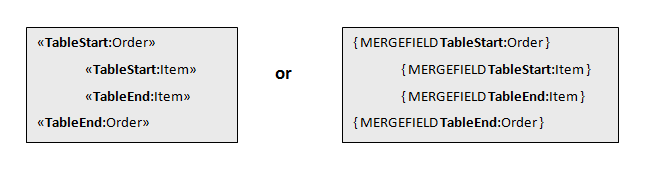 Example: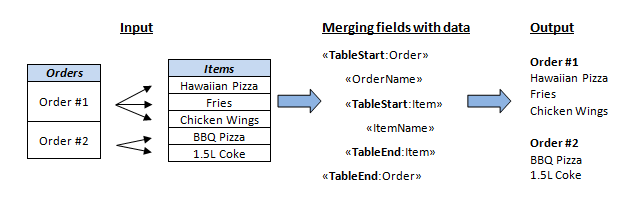
To insert a basic merge field in MS Word, click Insert -> Field -> MergeField and enter the same name as it will be used in your object (DataModel).
Parameters
| Name | Type | Description |
|---|---|---|
| token | Guid | User token, necessary for identification. |
| request | GenerateDocumentWithMergeDataRequest | Contains the data about generating the document |
| encryptDocument | bool | Boolean if the document needs to be encrypted, default false |
| encryptionkey | string | Document encryption key if encryption is needed |
Types
| Type | Description |
|---|---|
| Guid | A unique set of symbols, necessary for identification. |
| GenerateDocumentWithMergeDataRequest | Contains properties: Document (type of string) - base64 string for the document template. Most common usage is MS Word document with merge fields. RegionDatas (type of IEnumerable<GenerateDocumentRegionData>) - list of region datas, the objects used on creating dynamic sections in document with merge fields. There can be sources for mergedata: DataModel (type of string) - main data object converted to JSON string. Object properties are used in adding data to the end document XMLMergeData - XML is used as main data source. If both data source are provided XMLMergeData will be used. |
| GenerateDocumentRegionData | Contains properties: RegionName (type of string) - name of the region where the objects will be placed. Objects (type of IEnumerable<string>) - list of objects converted to JSON string. Object properties are used in adding data to the end document. |
Response
Method gives response (type
of string) which contains the document
bytes converted to a base64 string.
2.3.12. GetTransactionDetails
Technical description
Gets details of a transaction based on transaction token.Parameters
| Name | Type | Description |
|---|---|---|
| token | Guid | User token, necessary for identification. |
| transactionToken | Guid | Transaction token to identify transaction. |
Response
Returns an object
GetTransactionDetailsResponse with transaction
information by the given transaction token.
| Type | Property | Type | Description |
|---|---|---|---|
| GetTransactionDetailResponse | Token | Guid | Transaction token. |
| State | int | Transaction state | |
| SigningMethod | int | Intended signing method. | |
| AuthenticationMethod | int | Intended authentication method. | |
| CreatedOn | DateTime | When this transaction was created. | |
| RecipientEmail | string | Recipient email. | |
| RecipientPhoneNo | string | Recipient phone number. | |
| RecipientName | string | Recipient name. | |
| RecipientTitle | string | Recipent title. | |
| AdditionalData | string | Additional data that was passed on signing creation | |
| SenderName | string | Name of sender. | |
| Comments | Comment[] | List of comments on this transaction. | |
| ActivityLog | Activities[] | What has happened to this transaction. | |
| NextReminder | DateTime | When next reminder will happen. | |
| ExpireDue | DateTime | When expiry will happen. | |
| IsAnonymous | DateTime | Was this transaction signed anonymously. | |
| DistributionTypes | int[] | How this transaction will be distributed. | |
| SequenceNumber | int | For sequenced signinges - which position is this transaction in the sequence. | |
| Comment | Commenter | string | Who commented? |
| Text | string | The comment itself. | |
| Date | DateTime | Time when the comment was set. | |
| Activiy | SendOutDate | DateTime | Date of activity |
| Message | string | The activity. |
2.3.13. ReactivateTransaction
Technical description
Reactivates transaction based on transaction token. Only transactions with state failed or expired can be reactivated.Parameters
| Name | Type | Description |
|---|---|---|
| token | Guid | User token, necessary for identification. |
| transactionToken | Guid | Transaction token to identify transaction. |
2.3.14. CancelTransaction
(obsolete)
Technical description
Cancel transaction based on transaction token.Obsolete - use CancelSigning endpoint.
Parameters
| Name | Type | Description |
|---|---|---|
| token | Guid | User token, necessary for identification. |
| transactionToken | Guid | Transaction token to identify transaction. |
Example
| Request | Response |
|---|---|
| { "token": "c05f50aa-35f4-4fb8-8d3c-b70a9169d28a", "transactionToken": "abcf50aa-35f4-4fb8-8d3c-b70a9169d28f" } |
- |
2.3.15. UpdateTransaction
Technical description
Updates transaction based on transaction token. If Transaction is found by TransactionToken and updated with the new provided data. If any of the fields (RecipientName, RecipientPhoneNo, RecipientEmail) are null or empty - it will not be used to update transaction.Parameters
| Name | Type | Description |
|---|---|---|
| token | Guid | User token, necessary for identification. |
| request | UpdateTransactionRequest | An object with transaction information that needs updating |
Properties of types
| Type | Property | Type | Description |
|---|---|---|---|
| Guid |
|
|
A unique set of symbols, necessary for identification. |
| UpdateTransactionRequest | TransactionToken |
|
|
| RecipientName |
|
Name of the recipient, max 255 chars | |
| RecipientPhoneNo |
|
Recipient phone number, max 50 chars | |
| RecipientEmail |
|
Recipient email, max 255 chars |
Example
| Request |
|---|
| Guid |
{
    "token": "{{token}}",
    "request": {
        "RecipientEmail": "firstname.lastname@twoday.com",
        "RecipientName": "ExampleName",
        "RecipientPhoneNo": "+111555888444",
        "TransactionToken": "31412965-0be9-4c62-b074-314129654c62"
    }
}
|
2.3.16. SaveRecipient
Technical description
Saves a contact into Address Book. A contact must have unique Email and Phone fields, at least one of them must be provided. If a contact with provided values already exists, it will be updated, otherwise a new one will be inserted.
Parameters
| Name | Type | Description |
|---|---|---|
| token | Guid | User token, necessary for identification. |
| request | Contact | An object with contact information. |
Properties of types
| Type | Property | Type | Description |
|---|---|---|---|
| Guid |
|
|
A unique set of symbols, necessary for identification. |
| Contact | Name |
|
Name of the recipient, max 255 chars. |
| Title |
|
Title of the recipient, max 255 chars. | |
|
|
Recipient email, max 255 chars. | ||
| Phone |
|
Recipient phone number, max 50 chars. | |
| Cvr |
|
Company identification ID, max 12 chars. |
Example
| Request | Response |
|---|---|
{
  "token": "db8b5d64-6f45-4748-a93a-80022d150286",
  "request": {
    "Email": "mark.example@twoday.com",
    "Phone": "+1234567890",
    "Name": "Mark",
    "CVR": "01010101",
    "Title": "Manager"
  }
}
|
Response is only status code, endpoint does not return any content |
2.3.17. DeleteRecipient
Technical description
Deletes contact from Address Book. Matching is done by Name, Email and Phone fields. If a match is not found - nothing is deleted, in either way returns success response.
Parameters
| Name | Type | Description |
|---|---|---|
| token | Guid | User token, necessary for identification. |
| request | Contact | An object with contact information. |
Properties of types
| Type | Property | Type | Description |
|---|---|---|---|
| Guid |
|
|
A unique set of symbols, necessary for identification. |
| Contact | Name |
|
Name of the recipient, max 255 chars. |
| Title |
|
Title of the recipient, max 255 chars (not used currently). | |
|
|
Recipient email, max 255 chars. | ||
| Phone |
|
Recipient phone number, max 50 chars. | |
| Cvr |
|
Company identification ID, max 12 chars (not used currently). |
Example
| Request | Response |
|---|---|
{
  "token": "db8b5d64-6f45-4748-a93a-80022d150286",
  "request": {
    "Email": "mark.example@twoday.com",
    "Phone": "+1234567890",
    "Name": "Mark"
  }
}
|
Response is only status code, endpoint does not return any content |
2.3.18. ExportRecipients
Technical description
Exports all contacts from Address Book in CSV format.
Parameters
| Name | Type | Description |
|---|---|---|
| token | Guid | User token, necessary for identification. |
| separator | string | Separator to be used for CSV fields (defaults to ';'). |
Response
Response splits into two ways, one for SOAP service, another for REST.
SOAP: will return FileData type file object containing csv data in it
REST: This method returns UTF-8 encoded string containing CSV file data. Can be saved directly to file system.
2.3.19. ImportRecipients
Technical description
Import contacts from CSV file into Address Book. A contact must have unique Email and Phone fields, at least one of them must be provided. If there are contacts in Address Book that can be matched by Email or Phone they will be updated, otherwise a new contact will be inserted. For a correct CSV file format we recommend to first do ExportRecipients() call, and then edit the response file if needed.
Parameters
| Name | Type | Description |
|---|---|---|
| token | Guid | User token, necessary for identification. |
| data* | byte[] | Byte array of UTF-8 encoded string of CSV file data. |
| recipientsCsv** | string | Csv format string containing address book elements |
| separator | string | Separator to be used for CSV fields (defaults to ';'). |
|
*- apples for SOAP service only **- applies for REST service only |
||
Example (for REST)
| Request |
|---|
{
    "token":"{{token}}",
    "recipientsCsv":"Name;Title;Email;Phone;Cvr\r\nAddo First;;addo.first@addosign.net;;\r\nSecond;;addo.second@addosign.net;;",
    "separator":";"
}
|
2.3.20. GetCampaigns
Technical description
Get campaigns with same externa reference identifierParameters
| Name | Type | Description |
|---|---|---|
| token | Guid | User token, necessary for identification. |
| externalReference | string | External campaign identifier |
Response
| Type | Description |
|---|---|
| GetCampaignsResponse | Contains
properties: Campaigns - list of Campaign object Campaign contains: CampaignStateEnum - possible values Started = 1, Completed = 2, Canceled = 3 Signings - list of Signing objects Signing contains: Token - Signing token, public signing identifier State - State of Signing, SigningStateEnum TransactionState - State of Transaction, TransactionStateEnum |
Example
| Request | Response |
|---|---|
{
  "token": "db8b5d64-6f45-4748-a93a-80022d150286",
  "externalReference": null
}
|
{
  "Campaigns": [
    {
      "Signings": [
        {
          "State": 4,
          "Token": "41c8b5b3-a6a7-4eaf-9f97-dcd15886d029",
          "TransactionState": 7
        }
      ],
      "State": 2
    },
    {
      "Signings": [
        {
          "State": 4,
          "Token": "41c8b5b3-a6a7-4eaf-9f97-dcd15886d02a",
          "TransactionState": 7
        }
      ],
      "State": 2
    }
  ]
}
|
2.3.21. GetTemplateMessages
Parameters
| Name | Type | Description |
|---|---|---|
| token | Guid | User token, necessary for identification. |
| templateId | Guid | Template ID |
Response
| Type | Description |
| GetTemplateMessagesResponse | Contains
properties: ID- Guid of template TemplateMessages - list of SigningTemplateMessage SigningTemplateMessage contains: Subject, subject of email message Body, content of message UsageType, enum, StartMessage = 0, RemindMessage = 1, Distribution = 4, CampaignStartMessage = 5, CampaignRemindMessage = 6 Type, enum, Sms = 1, Email = 2, SigningPortalReceipt = 3 |
Example
| Response |
|---|
{
  "Id": "f2e2e62b-7d67-4695-8961-b2411dbd20a7",
  "TemplateMessages": [
    {
      "Body": "<p>Dear %recipientname%</p><p>%sender% has sent you a document which awaits your signing.You can sign the document by following the link below: %signingportalurl%.</p><p>Best Regards,<br /> %sender%<br /> %senderaccount%</p>",
      "Subject": "Document awaits your signing",
      "Type": 2,
      "UsageType": 0
    },
    {
      "Body": "<p>Dear %recipientname%,</p><p>%sender% has sent you a document which awaits your signing. You can sign the document by following the link below: %signingportalurl%.</p><p>Best Regards,<br /> %sender%<br />%senderaccount%</p>",
      "Subject": "Reminder: Document awaits your signing",
      "Type": 2,
      "UsageType": 1
    },
    {
      "Body": "<p>Dear %recipientname%</p><p>A copy of the signed documents is attached this e-mail.</p><p>Best Regards,<br /> %sender%<br /> %senderaccount%</p>",
      "Subject": "Receipt for signed document",
      "Type": 2,
      "UsageType": 4
    },
    {
      "Body": "Dear %recipientname%, <br/><br/> %sender% has added you to a campaign. You can participate by adding your information here %campaignsite%. Thank you. <br/><br/> Best regards <br/> %sender%<br/>%senderaccount%",
      "Subject": "Invitation to participate",
      "Type": 2,
      "UsageType": 5
    },
    {
      "Body": "Dear %recipientname%, <br/><br/> Please go to %campaignsite% and add your information to generate the document for you to sign. Thank you. <br/><br/> Best regards <br/> %sender%<br/>%senderaccount%",
      "Subject": "Reminder",
      "Type": 2,
      "UsageType": 6
    },
    {
      "Body": "Dear %recipientname%\n\n \n\nThis is test version of email from %sender% on url %signingportalurl%\n\n \n\nBest Regards\n",
      "Subject": null,
      "Type": 3,
      "UsageType": 8
    },
    {
      "Body": "%sender%%signingportalurl%%recipientname% abcde\n\nthis is test demo template for no receipt text\n",
      "Subject": null,
      "Type": 3,
      "UsageType": 9
    }
  ]
}
|
2.3.22. GetRejectionComment
Parameters
| Name | Type | Description |
| token | Guid | User token, necessary for identification. |
| signingToken | string | Signing Token |
Response
| Type | Description |
| GetRejectionCommentResponse | Contains
properties: RejectionComments
- RejectionComment[] - array
of rejection commentsRejectionComment
contains:TransactionToken -
[Guid] - transaction
Token Message - [string] - rejection comment/message RecipientName- [string] - full name of the user who rejected transaction Date - [DateTimeOffset] - rejection dateRecipientEmail - [string] - email of the user who rejected transaction RecipientPhone - [string] - phone number of the user who rejected transaction |
Example
| Response |
|---|
{
  "RejectionComments": [
    {
      "Date": {
        "DateTime": "/Date(1535614047058)/",
        "OffsetMinutes": 120
      },
      "Message": "Test rejection comment",
      "RecipientEmail": "nuttyfox.7cfofhn9@mailosaur.io",
      "RecipientName": "Tester",
      "RecipientPhone": null,
      "TransactionToken": "83078f88-70a4-486f-9006-b1ba4d668643"
    }
  ]
}
|
2.3.23. CreateGroup
Parameters
| Name | Type | Description |
| token | Guid | User token, necessary for identification. |
| request | CreateGroupRequest |
CreateGroupRequest contains two
properties: Name - [string] - name of the group Description - [string] - group description |
Response
| Type | Description |
| GroupResponse | Contains
properties: Id- [int] - Id of new group Name - [string] - name of the group Description - [string] - group description |
Example
| Request | Response |
|---|---|
{
  "token": "cbf214f0-114e-4ead-a837-10088002869e",
  "request": {
    "Name": "TestGroup2",
    "Description": "this is postman created group1"
  }
}
|
{
  "CreateGroupResult": {
    "Description": "this is postman created group1",
    "Id": 7789,
    "Name": "TestGroup2"
  }
}
|
2.3.24. GetGroups
Parameters
| Name | Type | Description |
| token | Guid | User token, necessary for identification. |
Response
| Type | Description |
| GetGroupsResponse | Contains
properties: List<GroupResponse> - list of GroupResponse model, which contains same properties as CreateGroup method response model. |
Example
| Request | Response |
|---|---|
| https://demo.addosign.net/WebService/v2.0/RestSigningService.svc/GetGroups?token=cbf214f0-114e-4ead-a837-10088002869e |
{
  "Groups": [
    {
      "Description": "This is for custom templates testing",
      "Id": 5074,
      "Name": "Custom templates group"
    }
  ]
}
|
2.3.25. CreateUser
Parameters
| Name | Type | Description |
| token | Guid | User token, necessary for identification. |
| request | CreateUserRequest |
CreateUserRequest contains these
properties: Email - [string] - email of user FullName - [string] - full name of user Phone - [string] - users phone LanguageId - [Language {int}] - enum value of language RoleId - [UserRole {int}] - enum value of user role SendWelcomeEmail - [bool] - should user get invitation email. If not, response will have password included Enum values: Language - Danish = 1, English = 2, Norwegian = 3, Swedish = 4, Finnish = 5, Dutch = 6 UserRole - Standard = 1, Administrator = 2 |
Response
| Type | Description |
| CreateUserResponse | Contains
properties: Id- [int] - Id of new user FullName - [string] - full name of new user Email - [string] - email of new user Password - [string] - if create user is used without sending welcome notification, Addo generates password and returns it in response, so web service user can send it by himself |
Example
| Request | Response |
|---|---|
{
  "token": "9ecdee94-3388-4fe4-baab-cf1f3eb0ac1b",
  "request": {
    "Email": "test.tester27@twoday.com",
    "FullName": "Test Namer27",
    "LanguageId": 2,
    "Phone": "+450000000",
    "RoleId": 3,
    "SendWelcomeEmail": false
  }
}
|
{
  "Email": "test.tester27@twoday.com",
  "FullName": "Test Namer27",
  "Id": 8912,
  "Password": "FtJP0NuA"
}
|
2.3.26. AddUserToGroup
Parameters
| Name | Type | Description |
| token | Guid | User token, necessary for identification. |
| request | AddUserToGroupRequest |
AddUserToGroupRequest contains two
properties: Email - [string] - email of user in the account you want to add to group GroupId- [int] - group ID in which user has to be added |
Example
| Request | Response |
|---|---|
{
  "token": "c05f50aa-35f4-4fb8-8d3c-b70a9169d28a",
  "request": {
    "Email": "firstname.lastname@twoday.com",
    "GroupId": 7789
  }
}
|
- |
2.3.27. CancelSigning
Parameters
| Name | Type | Description |
| token | Guid | User token, necessary for identification. |
| signingToken | Guid | Signing token to identify signing. |
Example
|
Request
|
Response
|
|---|---|
| { "token": "c05f50aa-35f4-4fb8-8d3c-b70a9169d28a", "signingToken": "abcf50aa-35f4-4fb8-8d3c-b70a9169d28f" } |
- |
Response
In case of success - that is, the signing was found and cancelled, a HTTP 200 OK response is given.
In case of failure, a HTTP 400 Bad Request response is given and the response text will include a fault code and fault text:
{
"FaultCode": 430,
"Reason": "Signing not found"
}
2.3.28. CreateAccount (secured)
Some of our integration parties can create accounts, but to do that, they have to contact Addo Sign and get approval. Also, the limitation for created account is enabled.Parameters
| Name | Type | Description |
| token | Guid | User token, necessary for identification. |
| request | CreateAccountRequest |
CreateAccountRequest contains these
properties:
Field required only if AccountLevel
is set:
Enum values: AccountLevel - Test = 2 |
Response
| Type | Description |
| CreateAccountResponse | Contains
properties: Id- [int] - Id of new account FullName - [string] - full name of new user Email - [string] - email of new user Password - [string] - Addo generated password or, if creating a test account, password sent with the create request. ResetPasswordUrl- [string] - If creating test account and password is not provided, this will have a URL to reset password page |
Example
| Request | Response |
|---|---|
| { "token": "9ecdee94-3388-4fe4-baab-cf1f3eb0ac1b", "request": { "Address": "Test st. 11-4", "CVR": "12345678", "City": "Test City", "CompanyName": "Company name of new account", "Country": "LTU", "Email": "new_account@email.com", "FullName": "New account name", "Locale": 2, "Phone": "+555000123456", "ZipCode": "12345-POST" } } |
{ "Email": "new_account@email.com", "FullName": "New account name", "Id": 8912, "Password": "FtJP0NuA" } |
|
{ |
{ "Email": "new_account@email.com", "FullName": "New account name", "Id": 8912, "Password": "TestPassword1234" } |
2.3.29. GetSignings
Get a list of signings, using small filter and pagination functionsParameters
| Name | Type | Description |
| token | Guid | User token, necessary for identification. |
| request | GetSigningsRequest |
GetSigningsRequestcontains these
properties: Note: |
Response
| Type | Property | Type | Description |
| GetSigningsResponse | Signings | List<SigningItem> | Contains list of SigningItem which has some information about signing |
| SigningItem | Token | string | Signing token which can be used for other actions, like GetSigning or GetSigningStatus |
| State | SigningStateEnum | Signing state. For the values you can check GetSigningStatus method | |
| CreatedOn | DateTime | Date when signing was created | |
| ExpiresOn | DateTime | Date when signing will expire or has expired | |
| CompletedOn | DateTime | Date when signing was completed | |
| ReferenceNumber | string | Reference number of the signing which was passed on creation as ability to separate signings | |
| AdditionalData | string | ||
| SigningId | int | Short Id (to address this signing in the new API) |
Example
| Request | Response |
|---|---|
{
  "token": "{{token}}",
  "request": {
    "Page": 1,
    "PageSize": 20,
    "CreatedOnFrom": "/Date(1574850672141)/",
    "CreatedOnTo": "/Date(1574936930225)/",
    "OrderType": 1
  }
}
|
{ [
{
"CreatedOn": "/Date(1574936535824)/",
"ExpiresOn": "/Date(1580210447029)/",
"CompletedOn": "/Date(1580210447000)/",
"ReferenceNumber": "R12134581",
"State": 1,
"Token": "41c8b5b3-a6a7-4eaf-9f97-dcd15886d029"
},
{
"CreatedOn": "/Date(1574857155100)/",
"CompletedOn": "/Date(1576066755000)/",
"ExpiresOn": "/Date(1576066755100)/",
"ReferenceNumber": null,
"State": 2,
"Token": "41c8b5b3-a6a7-4eaf-9f97-dcd15886d02a"
}
]
|
2.3.30. RefreshToken
Extends token for 5 more minutes in order you want to use the same tokenParameters
| Name | Type | Description |
| token | Guid | User token, necessary for identification. |
Response
| Type | Description |
| DateTime | Returns datetime value of token validity |
Example
| Request | Response |
|---|---|
| https://demo.addosign.net/WebService/v2.0/RestSigningService.svc/RefreshToken?token={{token}} | "/Date(1576508250275)/" |
2.3.31. Logout
Suspend session token validityParameters
| Name | Type | Description |
| token | Guid | User token, necessary for identification. |
Response
There is no response
object for this method. All you have to check
is response Status, it should be 200, which
means your token has been revoked and you are
no longer able to use it for other requests
Example
2.3.32. GetSecureTransferTemplates
Technical description
This method allows to get secure transfer signing templates of the user. It takes as a parameter user token and returns GetSigningTemplatesResponse with secure transfer signing templates inside. This method can be accessed through both SOAP and REST.Parameters
| Name | Type | Description |
| token | Guid | User token, necessary for identification. |
2.3.33. InitiateSecureTransfer
Technical description
This method initiates a secure file transfer process. Secure file transfer is used to transfer documents safely and efficiently to customers without without necessity to sign a document. Secure file transfer can be used in two ways. The first way is to send an invitation link to recipient and provide documents to download on our own Signing Portal. The other way is to send documents directly to chosen distribution integration (e-Boks or Safecloud at the moment). Only secure transfer templates can be used for secure file transfer (see 2.2.31 GetSecureTransferTemplates).SigningMethod for all RecipientData in a request must be set to None (0).
Parameters
| Name | Type | Description |
|---|---|---|
| token | Guid | User token, necessary for identification. |
| request | InitiateSecureTransferRequest | Contains data about how to create secure transfer. |
Response
Method gives response (type of InitiateSecureTransferResponse).| Type | Property | Property type | Description |
|---|---|---|---|
| InitiateSecureTransferResponse | SigningToken | string | Token of signing, unique identification. |
| Type | Property | Type | Description |
|---|---|---|---|
| InitiateSecureTransferResponse | SigningToken | string | Token of signing, unique identification. |
|
InitiateSecureTransferRequest |
Name | string | Defines name of a secure transfer. Mandatory, Max 100 chars. |
| StartDate | DateTime | Defines when a signing will start. StartDate value cannot be 24 hours before request is created. Mandatory. Uses UNIX date format like "/Date(1573638173002)/" | |
| SecureTransferData | SecureTransferData | Contains data about secure transfer. (Similar as Signing in InitiateSigningRequest except this one excludes these properties: BccRecipients, SigningSequence, AllowInboundEnclosures, ExternalReferenceId, EnclosureDocuments. See 2.2.2. InitiateSigning). | |
| SigningTemplateId | Guid | Defines a Guid which is associated with a template settings of a secure transfer template (authentication, message type etc.). | |
| ExpirationUrl | string | Expiration callback url. On expiration for the provided url it will add query string parameter "signingToken" | |
| TransactionStateChangedUrl | string | Transaction state changed callback url. On transaction state change for the provided url it will add query string parameters "signingToken", "transactionToken", "referenceNumber", "transactionStateId" |
Send documents directly
To send documents as secure file transfer directly to chosen channel (e.g. e-Boks) you need to set NotificationMethods of RecipientData to None (0). Then web service will use DistributionMethod as a sending method. For example, if NotificationMethods is set to None and DistributionMethod to Eboks (4) secure file transfer will be sent directly to recipient's e-Boks. This way is only available when you have e-Boks or Safecloud activated for your account.Allowed methods for RecipientData when sending directly:| Property | AllowedMethods |
|---|---|
| AuthenticationMethod | Only None (0) method is allowed. |
| SigningMethod | This method does not affect anything since there is no signing of documents in signing portal. |
| DistributionMethod | Only e-Boks
method (4) or null are allowed to be
set as DistributionMethod. If you want
to use Safecloud set DistributionMethod
to null and select signing template with Safecloud method. Setting RecipientData Cpr or Cvr decides which of e-Boks methods will be used (private or company). e-Boks or Safecloud must be activated for the account to use them. |
| NotificationMethods | This must set to None (0). Otherwise you will send a link of signing portal to recipient. |
Example
| Request | Response |
|---|---|
{
  "token": "126d6f15-997e-4280-a670-e30fec346392",
  "request": {
    "ExpirationUrl": null,
    "Name": "test signing",
    "SecureTransferData": {
      "AllowRecipientComment": true,
      "Documents": [
        {
          "Data": "base64stringOfFile",
          "Id": "1fe93abb-5363-4eb5-a89f-5210d38471d6",
          "MimeType": "application/pdf",
          "Name": "test.pdf"
        }
      ],
      "Recipients": [
        {
          "Address": null,
          "AuthenticationMethod": 0,
          "CVR": null,
          "Cpr": "0101987654",
          "Email": "test_recipient1@twoday.com",
          "Id": "4c24818a-eae2-4eb0-aa2e-f77ab355f77d",
          "Name": "TestName1",
          "PID": null,
          "Phone": null,
          "SwedishSsn": null,
          "NorwegianSsn": null,
          "SendDistributionDocument": null,
          "SendWelcomeNotification": true,
          "DistributionMethod": 4,
          "NotificationMethods": [0],
          "SigningMethod": 0,
          "Title": null
        }
      ],
      "ReferenceNumber": "666",
      "Sender": {
        "CompanyName": "SenderCompanyName",
        "Email": "sender.email@twoday.com",
        "Name": "SenderTestName",
        "Phone": null
      }
    },
    "SigningTemplateId": "95b29391-c23b-46d2-af51-ff9caa8edd9b",
    "StartDate": "/Date(1530791625)/",
    "TransactionStateChangedUrl": null
  }
}
|
{ "SigningToken": "41c8b5b3-a6a7-4eaf-9f97-dcd15886d029" } |
Send link
To send link of secure file transfer to signing portal you need to set DistributionMethod of RecipientData to None (1). Then web service will use NotificationMethods from RecipientData or MessageTypes from SigningTemplate to send an invitation.| Property | AllowedMethods |
|---|---|
| AuthenticationMethod | All methods described for AuthenticationMethodEnum are allowed except None (0). |
| SigningMethod | This method does not affect anything since there is no signing of documents in signing portal. |
| DistributionMethod | DistributionMethod must be set to None(1). |
| DistributionType | DistributionType must be set to None(0) |
| NotificationMethods | All methods are allowed except None(0). |
Example
| Request | Response |
|---|---|
{
  "token": "126d6f15-997e-4280-a670-e30fec346392",
  "request": {
    "ExpirationUrl": null,
    "Name": "test signing",
    "SecureTransferData": {
      "AllowRecipientComment": true,
      "Documents": [
        {
          "Data": "base64stringOfFile",
          "Id": "1fe93abb-5363-4eb5-a89f-5210d38471d6",
          "MimeType": "application/pdf",
          "Name": "test.pdf"
        }
      ],
      "Recipients": [
        {
          "Address": null,
          "AuthenticationMethod": 1,
          "CVR": null,
          "Cpr": "0101987654",
          "Email": "test_recipient1@twoday.com",
          "Id": "4c24818a-eae2-4eb0-aa2e-f77ab355f77d",
          "Name": "TestName1",
          "PID": null,
          "Phone": null,
          "SSN": null,
          "SendDistributionDocument": null,
          "SendWelcomeNotification": true,
          "DistributionMethod": 1,
          "NotificationMethods": [1],
          "SigningMethod": 0,
          "Title": null
        }
      ],
      "ReferenceNumber": "666",
      "Sender": {
        "CompanyName": "SenderCompanyName",
        "Email": "sender.email@twoday.com",
        "Name": "SenderTestName",
        "Phone": null
      },
      "SenderComment": "this is simple comment"
    },
        "SigningTemplateId": "95b29391-c23b-46d2-af51-ff9caa8edd9b",
    "StartDate": "/Date(1530791625)/",
    "TransactionStateChangedUrl": null
  }
}
|
{ "SigningToken": "41c8b5b3-a6a7-4eaf-9f97-dcd15886d029" } |
2.3.34. GetTransactionToken
Technical description
The method is used to get transactionToken if you got transactionId from integration like SFTP or Google Drive (transactionId is added to document name)Parameters
| Name | Type | Description |
| token | Guid | User token, necessary for identification. |
| transactionId | int | Id of transaction which token you want to retrieve |
| Type | Description |
| Guid? | TransactionToken is a response. Null is a response with status 200, when that transaction does not belong to this account or is not found at all. |
Exampl
| Request | Response |
|---|---|
| https://demo.addosign.net/WebService/v2.0/RestSigningService.svc/GetTransactionToken?token={{token}}&transactionId=123456 | "4c24818a-eae2-4eb0-aa2e-f77ab355f77d", |
2.3.35. GetSigningWithoutDocuments
Technical description
This method is almost duplicate for GetSigning except it does not generate and return documents, so it retrieves the same data, only Documents and Enclosures arrays are empty.Example and request and response can be found at 2.2.5 GetSigning method
2.3.36. GetAccounts
Get a list of your sub accounts.
Parameters
| Name | Type | Description |
| token | Guid | User token, necessary for identification. |
| filter | GetAccountsFilter |
Filter itself is optional, if null, will return all sub accounts available GetAccountsFilter contains
these properties: Search for a sub account,
which has user, containing specific
external login
identifier) Enum values: Note: If you do not provide UserExternalProviderType and UserExternalProviderId they will be null in response even if they exist |
Response
| Type | Property | Type | Description |
| GetAccountsResponse | Accounts | List<AccountInfo> | Contains list of AccountInfo which has some information about account |
| AccountInfo | AccountId | int | Addo account id |
| CompanyName | string | Company name of an account, might be null | |
| CreatedOn | DateTime | Date when account was created | |
| ExternalId | string | Account external identifier, which has been passed on account creation. Deprecated. Use AdditionalData instead. | |
| UserExternalProviderType | ExternalProviderEnum | External user login from the filter | |
| UserExternalProviderId | string | External user login identifier from the filter | |
| IsActive | bool | Flag showing if the account is still active |
Example
| Request | Response |
|---|---|
{
  "token": "126d6f15-997e-4280-a670-e30fec346392",
  "filter": {
    "AccountId": null,
    "UserExternalProviderType": null,
    "UserExternalProviderId": null,
    "CreatedFrom": "/Date(1574850672141)/",
    "CreatedTo": "/Date(1574936930225)/"
  }
}
|
{
    "Accounts": [
        {
            "AccountId": 1710,
            "CompanyName": "",
            "CreatedOn": "/Date(1551736800000+0200)/",
            "UserExternalProviderId": null,
            "UserExternalProviderType": null,
                        "IsActive": true
        },
        {
            "AccountId": 1724,
            "CompanyName": "Company name of test",
            "CreatedOn": "/Date(1557003600000+0300)/",
            "UserExternalProviderId": null,
            "UserExternalProviderType": null,
                        "IsActive": false
        }
    ]
}
|
2.3.37. GetAccountCreditsUsage
Get a number of accounts credit usages for a specific period of time
Parameters
| Name | Type | Description |
| token | Guid | User token, necessary for identification. |
| filter | AccountCreditsUsageFilter |
Filter is mandatory AccountCreditsUsageFilter contains
these properties: |
Response
| Type | Property | Type | Description |
| AccountCreditsUsageResponse | AccountId | int | Addo account id |
| UsedCredits | decimal | Number of credits used. This number is shown credits spent for already completed, expired, failed, cancelled, rejected. | |
| DateFrom | DateTime | DateFrom used in filter | |
| DateTo | DateTime | DateTo used in filter |
Example
| Request | Response |
|---|---|
{
  "token": "126d6f15-997e-4280-a670-e30fec346392",
    "filter": {
        "AccountId": 1816,
        "DateFrom": "/Date(1551736800000)/",
        "DateTo": "/Date(1603720913016)/"
    }
}
|
{ {
"AccountId": 1816,
"DateFrom": "/Date(1548972000000)/",
"DateTo": "/Date(1603720913016)/",
"UsedCredits": 151.25
}
|
2.3.38. CalculateCompletedSigningsCount (paired with GetCompletedSigningsCount)
This method will initiate calculation for your account and all your sub accounts created signings per specific period providen in the request. Each signing type will be separated in the response (see more in 2.3.39 GetCompletedSigningsCount). This implementation of two separate methods is done because you may want to search database for all time entries and it can take longer than timeout period can handle, so we generate this data and store it for specific time (currently it is set to 1 week, might be changed in the furute).
Parameters
| Name | Type | Description |
| token | Guid | User token, necessary for identification. |
| request | CalculateCompletedSigningsCountRequest |
CalculateCompletedSigningsCountRequest contains
these properties: |
Response
| Type | Property | Type | Description |
| CalculateSigningsCountResponse | GetSigningsCountToken | Guid | A special token which should be used in GetTransactionsCount endpoint to retrieve generated data |
| TokenValidTo | DateTime | Date value until when GetSigningsCountToken can be used |
Example
|
Request |
Response |
||
|---|---|---|---|
|
{
|
2.3.39. GetCompletedSigningsCount
This method is used to retrieve data, calculated by CalculateCompletedSigningsCount endpoint with that approriate response token.
Parameters
|
Name |
Type |
Description |
|---|---|---|
| token | Guid | Unique identifier to identify user. |
| getCompletedSigningsCountToken | Guid | Token for retrieving stored data of signings counts for accounts and sub accounts. |
Properties of types
| Type | Property | Type | Description |
|---|---|---|---|
|
SigningsCountResponse |
GeneratedOn | DateTime? | Date when data was generated. If it is null, it is not generated yet |
| ExpiresOn | DateTime | Date when this entry expires. If you call this endpoint after this expiration date is expired, you will not get this response object | |
| Filter | CalculateCompletedSigningsCountRequest | Filter of the previously called request to see what filter values has been used for this data. (see CalculateCompletedSigningsCountR endpoint for more info about this field) | |
| AccountsSigningsCounts | AccountSigningsResponse[] | List of signings count for account for specific signing type | |
| AccountSigningsResponse | AccountId | int | Account identifier |
| AccountExternalid | string | Account external identifier (the same which might be added on creation of sub account) | |
| SigningType | SigningTypeEnum | Signing type of Addo workflow | |
| SigningsCount | int | Number of signings |
Enum values
| Type | Value | Description |
|---|---|---|
|
SigningTypeEnum |
Signing(1) | Regular document signing type |
| SecureTransfer(2) | Secure file transfer signing type | |
| Form(3) | Addo forms signing type | |
| CprValidation(4) | Cpr validation signing type |
Example
|
Request |
|---|
|
https://demo.addosign.net/WebService/v2.0/RestSigningService.svc/GetCompletedSigningsCount?token=994d2e31-436f-4a56-997c-54845ce74912&getCompletedSigningsCountToken=0a4d2e31-436f-4a56-997c-54845ce7493e |
|
Response |
|---|
{
    "AccountsSigningsCounts": [
        {
            "AccountExternalId": null,
            "AccountId": 2909,
            "SigningType": 1,
            "SigningsCount": 33
        },
        {
            "AccountExternalId": null,
            "AccountId": 2909,
            "SigningType": 2,
            "SigningsCount": 7
        },
        {
            "AccountExternalId": null,
            "AccountId": 2909,
            "SigningType": 3,
            "SigningsCount": 2
        }
    ],
    "ExpiresOn": "/Date(1624516027583)/",
    "Filter": {
        "CallbackUrl": "https://www.google.com/",
        "DateFrom": "/Date(1560752827468)/",
        "DateTo": "/Date(1623911227468)/"
    },
    "GeneratedOn": "/Date(1623911228192)/"
}
|
2.3.40. GetFormTemplates
This method is used to retrieve form templates available for the user.
Parameters
|
Name |
Type |
Description |
|---|---|---|
| token | Guid | Unique identifier to identify user |
Properties of response types
| Type | Property | Type | Description |
|---|---|---|---|
|
FormTemplatesResponse |
FormTemplates | FormTemplateForView[] | List of form templates |
| FormTemplate | Id | Guid | Form template identifier |
| FriendlyName | string | Form template name | |
| GroupName | string | Group name to which the form belongs |
Example
|
Request |
|---|
|
https://demo.addosign.net/WebService/v2.0/RestSigningService.svc/GetFormTemplates?token=994d2e31-436f-4a56-997c-54845ce74912 |
|
Response |
|---|
{
    "FormTemplates": [
        {
            "FriendlyName": "Common template",
            "GroupName": "Default",
            "Id": "994d2e31-436f-4a56-997c-54845ce74912"
        },
        {
            "FriendlyName": "Accounting review",
            "GroupName": "Accounting",
            "Id": "03c1279f-0863-431b-ae17-0d33ca2813f1"
        }
    ]
}
|
2.3.41. GetFormTemplate
This method is used to retrieve detailed form template data available for the user.
Parameters
|
Name |
Type |
Description |
|---|---|---|
| token | Guid | Unique identifier to identify user |
| id | Guid | Unique form identifier |
Properties of response types
| Type | Property | Type | Description |
|---|---|---|---|
|
GetFormTemplateResponse |
Id | Guid | Form template identifier |
| Name | string | Form template name | |
| DocumentFilename | string | Form template document name | |
| Components | FormComponentForView[] | List of form template components | |
| FormComponentForView | Id | Guid | Component identifier |
| ParentId | Guid | Parent component identifier | |
| Type | ComponentTypeEnum | Component type. Can have values: Section (1), TextInput (2), TextArea (3), RadioGroup (4), RadioOption (5), Text (6), Title (7), Checkbox (8), CheckboxGroup (9), File (10), Datepicker (11), Image (12), ImageFormat (13), ImageAlignment (14). | |
| Order | int | Order number in the form | |
| Label | string | Component label | |
| Value | string | Prefilled component value | |
| Required | bool | Returns if field is required | |
| Locked | bool | Returns if field is locked | |
| DataMappingId | string | Returns data mapping id |
Example
|
Request |
|---|
|
https://demo.addosign.net/WebService/v2.0/RestSigningService.svc/GetFormTemplate?token=994d2e31-436f-4a56-997c-54845ce74912&id=03c1279f-0863-431b-ae17-0d33ca2813f1 |
|
Response |
|---|
{
    "Id": "03c1279f-0863-431b-ae17-0d33ca2813f1",
    "Name": "Review template",
    "Components": [
        {
            "Id": "29288893-5a15-ec11-a836-005056a9f00b",
            "Label": null,
            "Order": 0,
            "ParentId": null,
            "Type": 1,
            "Value": null
        },
        {
            "Id": "2b288893-5a15-ec11-a836-005056a9f00b",
            "Label": null,
            "Order": 1,
            "ParentId": null,
            "Type": 1,
            "Value": null
        },
        {
            "Id": "2c288893-5a15-ec11-a836-005056a9f00b",
            "Label": "Review",
            "Order": 0,
            "ParentId": "2b288893-5a15-ec11-a836-005056a9f00b",
            "Type": 7,
            "Value": null
        },
        {
            "Id": "2e288893-5a15-ec11-a836-005056a9f00b",
            "Label": "How do you do?",
            "Order": 1,
            "ParentId": "2b288893-5a15-ec11-a836-005056a9f00b",
            "Type": 2,
            "Value": Great
        },
        {
            "Id": "6f442152-5c15-ec11-a836-005056a9f00b",
            "Label": null,
            "Order": 1,
            "ParentId": "29288893-5a15-ec11-a836-005056a9f00b",
            "Type": 2,
            "Value": null
        },
        {
            "Id": "70442152-5c15-ec11-a836-005056a9f00b",
            "Label": null,
            "Order": 0,
            "ParentId": "29288893-5a15-ec11-a836-005056a9f00b",
            "Type": 2,
            "Value": null
        }
    ]
}
|
2.3.42 GetFormResponse
This method returns responses to a particular form.
Parameters
|
Name |
Type |
Description |
|---|---|---|
| token | Guid | Unique identifier to identify user |
| transactionToken | Guid | Unique transaction identifier |
Properties of response types
| Type | Property | Type | Description |
|---|---|---|---|
| GetFormResponse |
Components | FormComponentForView[] | List of form template components |
| FormComponentForView | Id | Guid | Component identifier |
| ParentId | Guid | Parent component identifier | |
| Type | ComponentTypeEnum | Component type. Can have values: Section (1), TextInput (2), TextArea (3), RadioGroup (4), RadioOption (5), Text (6), Title (7), Checkbox (8), CheckboxGroup (9), File (10), Datepicker (11), Image (12), ImageFormat (13), ImageAlignment (14). | |
| Order | int | Order number in the form | |
| Label | string | Component label | |
| Value | string | Prefilled component value | |
| DataMappingId | string | Returns data mapping id |
Example
|
Request |
|---|
|
https://demo.addosign.net/WebService/v2.0/RestSigningService.svc/GetFormResponse?token=994d2e31-436f-4a56-997c-54845ce74912&transactionToken=13C12E09-98A6-4577-8DBD-28ABA116AD52 |
|
Response |
|---|
{
    "Components": [
        {
            "Id": "5898cf0b-027d-ec11-a845-005056a9f00b",
            "Label": null,
            "Order": 0,
            "ParentId": null,
            "Type": 1,
            "Value": null
        },
        {
            "Id": "5998cf0b-027d-ec11-a845-005056a9f00b",
            "Label": null,
            "Order": 1,
            "ParentId": null,
            "Type": 1,
            "Value": null
        },
        {
            "Id": "5a98cf0b-027d-ec11-a845-005056a9f00b",
            "Label": "proof",
            "Order": 1,
            "ParentId": "5998cf0b-027d-ec11-a845-005056a9f00b",
            "Type": 10,
            "Value": "           {\"Name\":\"image.png\",\"ContentType\":\"image/png\",\"Data\":\"iVBORw0KGgoAAAANSUhEUgAACN4AAAGyCAYAAAAx5ZtnAAAgA
                                ElEQVR4Aezd65Nc5Z0n+Ho5/4H0ko1+441+YTZiY2kNYwAAAABJRU5ErkJggg==\"}"
        },
        {
            "Id": "5b98cf0b-027d-ec11-a845-005056a9f00b",
            "Label": null,
            "Order": 1,
            "ParentId": "5898cf0b-027d-ec11-a845-005056a9f00b",
            "Type": 2,
            "Value": "email@twoday.com"
        },
        {
            "Id": "5c98cf0b-027d-ec11-a845-005056a9f00b",
            "Label": null,
            "Order": 0,
            "ParentId": "5898cf0b-027d-ec11-a845-005056a9f00b",
            "Type": 2,
            "Value": "TestName"
        },
        {
            "Id": "5d98cf0b-027d-ec11-a845-005056a9f00b",
            "Label": "what are you?",
            "Order": 0,
            "ParentId": "5998cf0b-027d-ec11-a845-005056a9f00b",
            "Type": 4,
            "Value": "answer2"
        },
        {
            "Id": "5e98cf0b-027d-ec11-a845-005056a9f00b",
            "Label": "answer1",
            "Order": 1,
            "ParentId": "5d98cf0b-027d-ec11-a845-005056a9f00b",
            "Type": 5,
            "Value": null
        },
        {
            "Id": "5f98cf0b-027d-ec11-a845-005056a9f00b",
            "Label": "answer1",
            "Order": 0,
            "ParentId": "5d98cf0b-027d-ec11-a845-005056a9f00b",
            "Type": 5,
            "Value": null
        }
    ]
}
|
2.3.43. InitiateFormSigning
This method initiates a new form filling and signing.
Parameters
|
Name |
Type |
Description |
|---|---|---|
|
token |
Guid |
Unique identifier to identify user |
|
request |
InitiateFormSigningRequest |
Contains data about how to create form signing |
Properties of request types
| Type | Property | Type | Description |
|---|---|---|---|
|
InitiateFormSigningRequest |
FormTemplateId | Guid | Form template identifier |
| ReferenceNumber | string | Defines an optional reference number for transactions. Max 36 chars. | |
| ComponentValueOverrides | ComponentValueOverride[] | Optional form template component values overrides. | |
| Respondent | Recipient | Recipient who fills the form data. | |
| Recipients | Recipient[] | Contains recipients which are associated with the signing. | |
| BccRecipients | BccRecipient[] | Specifies recipients which receive distribution email as BCC. | |
| DocumentFilename | string | Optional, if
added, it will override FormTemplate →
DocumentFilename value. Maxlength 200 characters, does not allow file system characters set [ < > / | ? \ ' " ] |
|
| AdditionalData | string | ||
| Callbacks | Callback[] | An array of callbacks. | |
| ComponentValueOverride | ComponentId | Guid | Component identifier |
| Value | string | Component value override | |
| DataMappingId | string | Unique title set in WebAdmin, if not empty will be prioritized over id. | |
| Recipient | Id | Guid | Unique Guid to identify recipient (optional and used to match with SequenceItem). |
| ExternalId | string | String value to identify recipient. This value will be provided with GetSigning method. Deprecated. Use AdditionalData instead. | |
| Cpr | string | Defines Cpr (personal identification) number. Max 10 chars | |
| PID | string | NemID public ID. Max 20 | |
| Name | string | Defines name of the recipient. Max 255 chars | |
| Address | string | Defines address of the recipient. Max 150 chars | |
| string | Defines email of the recipient. He will receive letters from the web service in this email. Max 255 chars | ||
| Phone | string | Defines phone of the recipient. He will receive SMS from the web service in this phone, if distribution is set to SMS. Max 50 chars | |
| SignedDate | DateTimeOffset | Defines when the document was signed by the user (not specified by creator of the signing) | |
| CVR | string | Company identification ID. Max 12 chars. | |
| SSN (deprecated) | string | It used to be one field for both Norwegian and Swedish ssn, for both separate fields exists, see SwedishSsn and NorwegianSsn | |
| SwedishSsn | string | Swedish personal number in a format 'yyyymmddnnnn'. allowed number of characters: 12 | |
| NorwegianSsn | string | Norwegian personal number. Max 12 chars. | |
| TupasSsn | string | SSN for Tupas signing. | |
| TemplateDataContainer | TemplateData | Defines template for generating document (using XSLT transformation). | |
| SendWelcomeNotification | bool | If Null default True. | |
| SendDistributionNotification | bool | If Null default True. OBSOLETE, use DistributionMethod instead | |
| SendDistributionDocument | bool | If Null default True. OBSOLETE, use DistributionMethod instead | |
| SigningMethod | SigningMethodEnum? | Can be Null. Defines Recipient signing method, overrides selected Template signing method. If not defined (Null) Template signing method will be used | |
| AuthenticationMethod | AuthenticationMethodEnum? | Can be Null. Defines Recipient authentication method, overrides Template authentication method. If not defined (Null) Template authentication method is used | |
| Title | string | Recipient title. Max 255 chars. | |
| DistributionMethod | DistributionMethodEnum? | Can be null. Defines Recipient distribution method, overwrites values from template and fields SendDistributionNotification and SendDistributionDocument. Valid values: None (1), Message with documents (2), Message without documents (3), Distribute to e-Boks (4) | |
| AllowApproveAllAttachments | bool | Defines if recipient will be able to approve all attachments at once | |
| IsQuestionnaireEnabled | bool | Defines if recipient will be asked to fill answers for questionnaire | |
| Secret | string | Secret is mandatory only when using authentication method SecretCcode. Max 255 characters | |
| NotificationMethods | MessageTypeEnum[] | Can be Null. Defines Recipient notification methods, overrides Template MessageTypes. If not defined (Null) Template MessageTypes is used. | |
| AdditionalData | string | Optional. Field to store any data per Recipient. Limited to 4000 characters | |
| RecipientSignaturePlacements | RecipientSignaturePlacement[] | Optional. Defines signature placements | |
| BccRecipientData | Name | string | Max chars 255. |
| string | Email of bcc recipient. |
Properties of response types
| Type | Property | Type | Description |
|---|---|---|---|
|
InitiateFormSigningResponse |
FormFillingUrl | string | Url address with which we can access form filling. |
| GeneratedSignings | GeneratedSigning[] | List of generated signings. | |
| GeneratedSigning | Url | string | Url address with which we can access form signing after it was filled and signed by respondent. |
| SigningToken | Guid | Unique token for signing. |
Example
|
Request |
|---|
|
https://demo.addosign.net/WebService/v2.0/RestSigningService.svc/InitiateFormSigning {
"token": "{994d2e31-436f-4a56-997c-54845ce74912}",
"request": {
"FormTemplateId": "03c1279f-0863-431b-ae17-0d33ca2813f1",
"ComponentValueOverrides" : [
{
"ComponentId" : "2e288893-5a15-ec11-a836-005056a9f00b",
"Value" : "OVERRRIDEN"
}
],
"Recipients": [
{
"AdditionalData": "data",
"AllowApproveAllAttachments": "true",
"AuthenticationMethod": "0",
"DistributionMethod": "2",
"Email": "randomuser@yahoo.com",
"IsQuestionnaireEnabled": "false",
"Name": "Random User",
"Phone": "+48972645315",
"SendDistributionDocument": "true",
"SendDistributionNotification": "true",
"SendWelcomeNotification": "true",
"SigningMethod": 6,
"NotificationMethods": [1]
}
],
"Respondent": {
"AllowApproveAllAttachments": "true",
"AuthenticationMethod": "0",
"DistributionMethod": "2",
"Email": "veryrandomuser@yahoo.com",
"IsQuestionnaireEnabled": "false",
"Name": "Very Random User",
"Phone": "+48972689565",
"SendDistributionDocument": "true",
"SendDistributionNotification": "true",
"SendWelcomeNotification": "true",
"SigningMethod": 6,
"NotificationMethods": [1]
},
"ReferenceNumber": "7/1",
"Callbacks": [
{
"Url": "http://www.distributionurl.com",
"Type": 1
}
],
}
}
|
|
Response |
|---|
{
    "FormFillingUrl": "https://demo.addosign.net/Forms/#/view?token=bcc842d4-8727-4964-9ae3-c46870366be3",
    "GeneratedSignings": [
        {
            "SigningToken": "bcc842d4-8727-4964-9ae3-c46870366be3",
            "Url": "https://demo.addosign.net/SigningPortal/?token=a5a322cc-fd60-4806-8d2d-78cc52b59c8c"
        },
        {
            "SigningToken": "bcc842d4-8727-4964-9ae3-c46870366be3",
            "Url": "https://demo.addosign.net/SigningPortal/?token=359127aa-e58e-4270-8a58-dd87b08bc112"
        }
    ]
}
|
2.3.44. UpdateSigningExpirationDate
Updates signing expiration date.
Parameters
| Name | Type | Description |
| token | Guid | User token, necessary for identification. |
| request | UpdateSigningExpirationDateRequest | Contains data for expiration date update |
Properties of request types
| Type | Property | Type | Description |
|---|---|---|---|
|
UpdateSigningExpirationDateRequest |
SigningToken | string | Signing identifier |
| NewExpirationDate | DateTime | New expiration date (must be after now, but no later than 90 days). |
Example
|
Request |
Response |
|---|---|
|
{ |
- |
2.3.45. ImportFormTemplate
Imports form template
Parameters
| Name | Type | Description |
| token | Guid | User token, necessary for identification. |
| request | ImportFormTemplateRequest | Contains data for import request |
Properties of request types
| Type | Property | Type | Description |
|---|---|---|---|
|
ImportFormTemplateRequest |
GroupId | string | Group id of the group template should be placed in. |
| SigningTemplateId | Guid | Id of the signing template to be used. | |
| Template | string | Base 64 string of exported json file |
Response types
|
Type |
Description |
|---|---|
|
guid |
The id of the imported form |
Example
|
Request |
Response |
|---|---|
|
{
"GroupId" : "1692", } |
"c05f50aa-35f4-4fb8-8d3c-b70a9169d28a" |
2.3.46. ExportFormTemplate
EXPORTED FILE MUST NOT BE MODIFIED
Export has a tree structure: each component has a parent that it belongs to, an exception to this is "section" component, it is the top component and it has no parents. Radio buttons also support dependant components that show up when an option is chosen. Dependant components are defined by "DependsOn" parameter.
Exports form template. Template fields that are dependant on signing template don't get exported.
Parameters
| Name | Type | Description |
| token | Guid | User token, necessary for identification. |
| formTemplateId | Guid | Id of the form template to export/ |
Example
|
Request |
Response |
|---|---|
|
GET https://demo.addosign.net/WebService/v2.0/restsigningservice.svc/ExportFormTemplate?token={{token}}&formTemplateId=91467104-d189-4465-8f73-b1a9b134d2d2 |
Base 64 string of json file. |
Structure of the export file:
FormComponentModel
structure:
| Field | Type | Explanation |
|---|---|---|
|
Id |
guid | Id of the component |
|
ParentId |
guid | id of the parent component |
|
Type |
string |
Type of the component. Values: "section" "textInput" "textArea" "radioGroup" "radioOption" "text" "title" "checkbox" "checkboxGroup" "file" "datepicker" "image" "imageFormat" "imageAlignment" |
|
Order
|
int | Order of component in current level. Starts from 0. |
|
Label
|
string | String value of component,value depends on component type |
|
Value
|
string | String value of component,value depends on component type |
|
DataMappingId
|
string | Value of Data output ID field |
|
ValidationRules
|
ValidationRule[] | Validation rules for component |
|
DependsOn
|
guid | Id of component this component depends on. |
|
TemplateField |
int | not used, ignore this field. |
| Field | Type | Example | Explanation |
|---|---|---|---|
Name
|
string |
"Form template name" |
Template name |
Title
|
string |
"Form title" |
Template title |
Description
|
string |
"Form description" |
Template description |
CreatedOn
|
DateTime |
"2023-01-24T10:51:11.3343099+01:00" |
Template creation date |
UpdatedOn
|
DateTime |
"2023-01-24T10:51:11.3343099+01:00" |
Last template update date |
PublicLinkEnabled
|
bool |
true |
Is this a public form |
DisplayDataMapping
|
bool |
true |
Should "Data output ID" field be visible for imported form |
CorrelationId
|
guid |
"c386aaae-44c1-4122-8f53-33191a5209e2" |
An id used to to correlate form templates. On import, if a form template with this correlation id is found in the system, it will be overriden instead of created. If corelation id is not found a new form template is created. |
Components
|
FormComponentModel[] |
[ |
An unordered list of form template components. |
Example of exported
file:
|
Export Json |
Form template view in web admin |
|---|---|
|
{ |
|

2.3.47. GenerateDocumentWithMergeData
Generate a PDF from a source XML file with merge data.
Parameters
| Name | Type | Description |
| token | Guid | User token, necessary for identification. |
| request | GenerateDocumentWithMergeDataRequest | Contains data about the merge document |
| encryptDocument | bool | Sets whether document should be encrypted or not. Default is false |
| encryptionKey | string | Sets the encryption key default is null |
Properties of request types
| Type | Property | Type | Description |
|---|---|---|---|
|
GenerateDocumentWithMergeDataRequest |
Document | string | base 64 string of the document |
| RegionDatas | GenerateDocumentRegionData[] | ||
| DataModel | string | ||
| XmlMergeData | string | ||
| GenerateDocumentRegionData | RegionName | string | |
| Objects | string[] |
Example
|
Request |
Response |
|---|---|
|
POST https://demo.addosign.net/WebService/v2.0/restsigningservice.svc/GenerateDocumentWithMergeData
{ |
Base 64 string of the file |
2.3.48. GetFormSigningTemplates
Technical description
This method allows to get form signing templates of the user. It takes as a parameter user token and returns GetSigningTemplatesResponse with form signing templates inside. This method can be accessed through both SOAP and REST.
Parameters
| Name | Type | Description |
| token | Guid | User token, necessary for identification. |
Response
This method returns GetSigningTemplatesResponse. See 2.2.4. GetSigningTemplates for more info about response type.
2.3.49. GetFormFile
This method allows to download file which is uploaded in form answer for file upload component
Parameters
| Name | Type | Description |
| token | Guid | User token, necessary for identification. |
| originalDocumentId | Guid | File id (you can get it from GetFormResponse file component Value property) |
Properties of response types
| Type | Property | Type | Description |
|---|---|---|---|
|
EnclosureDocument |
AdditionalData |
string | Additional data |
|
Data |
byte[] | Byte array of document | |
| Name | string | Name of the file |
Example
|
Request |
|---|
|
GET https://demo.addosign.net/WebService/v2.0/RestSigningService.svc/GetFormFile?token={{token}}&originalDocumentId={{originalDocumentId}} |
|
Response |
|---|
|
{ "AdditionalData":
null, |
2.3.50. GenerateDocument
Generate PDF from template.
Parameters
| Name | Type | Description |
| token | Guid | User token, necessary for identification. |
| request | GenerateDocumentRequest | Contains data about the merge document |
Properties of request types
| Type | Property | Type | Description |
|---|---|---|---|
|
GenerateDocumentRequest |
RecipientData | RecipientData[] | Recipients (see InitiateSigning for structure) |
| DocumentTemplate | string |
2.3.51. CreateSigningTemplate (BETA)
Create a signing template. Please, use the builtin functionality in WebAdmin (https://addosign.net). If you must use this function please contact your account manager in Addo Sign who will forward you to a developer who can help in sorting out the values to be supplied.
Parameters
| Name | Type | Description |
| token | Guid | User token, necessary for identification. |
| request | SigningTemplate | The signing template to create |
Properties of request types
| Type | Description |
|---|---|
| SigningTemplate |
Contains properties: Id (Guid), OriginalId (Guid), SigningType, FriendlyName (string), DurationDays (int), NotificationInterval (int), LastReminder (int), DocumentEncryption, Enclosure, WelcomeNotification, ReminderNotification, DistributionNotification, CampaignInvitationNotification, CampaignReminderNotification, SigningPortalReciptText, ApproveMessage, ApproveReminderMessage, GroupId, Language, MessageOptions, GridConfiguration, FeedbackForm, SigningTemplateActions, BccRecipients, Recipients, EboksEnabled, DigitalPostEnabled, MitDkEnabled, NotificationCallbackEnabled, AllowApproveAllAttachments, FeedbackFormEnabled, IsFeedbackFormMandatory, IsAuthenticationOnDownloadDefault, DistributionType, AuthenticationMethod, SigningMethod, MandatoryComponents, SigningTemplateCallbacks, SignWithOneKey, CanAddAdditionalSigners, CanAddWitness, ColorCode, InheritDesignSettings, LogoId, LogoUrl, ShouldDeleteLogo, CanPlaceSignature, DefaultBccAttachmentType |
2.3.52. GetFormFileBase64
This is the same as 2.3.49 GetFormFile. However, data is return Base64 formatted.
2.3.53. GetSigningBase64
This is the same as 2.3.5 GetSigning. However, data is return Base64 formatted.
3. Custom extensions
The following extensions have been defined. The base URL for these is:
https://addosign.net/WebService/v2.0/restsigningservice.svc/
All calls still requires a valid Login token.
As per the main API, input models must be converted to JSON.
Output error codes is still sent in the HTTP-status header.
3.1 InitiateJSONFormSigning
POST /InitiateJSONFormSigning
Input:
InitiateJSONFormSigningOuterRequest
Output:
InitiateJSONFormSigningResponse
3.1.1 Input Models
InitiateJSONFormSigningOuterRequest
| Property | Mandatory | Type | Description |
|---|---|---|---|
| Token | yes | string | The token from the /Login call. |
| Request | yes | InitiateJSONFormSigningRequest | The request body. |
InitiateJSONFormSigningRequest
| Property | Mandatory | Type | Description |
|---|---|---|---|
| SigningTemplateId | yes | string | The signing template to use for this form. |
| ReferenceNumber | string | A PFA private reference number. | |
| Respondent | yes | RecipientDto | The first respondent. The first respondent will be the one filling out the form. |
| Recipients | RecipientDto[] | List of additional signers. Can be an empty list. | |
| AdditionalData | string | A PFA private additional data block. | |
| JSONForm | yes | JSONForm | The JSON form definitions. |
| Preview | bool | Set to true to preview form (submit button disabled), false to generate a full signing flow. |
RecipientDto
| Property | Mandatory | Type | Description |
|---|---|---|---|
| ExternalID | Guid | External ID of this recipient. Deprecated. Use AdditionalData instead. | |
| Title | string | Associated title of this recipient such as "Director", "Manager", ... | |
| Name | yes | string | Name of recipient. |
| yes | string | Recipients email address. | |
| Phone | string | Recipients phone number. | |
| Cpr | string | CPR | |
| CVR | string | CVR | |
| SwedishSsn | string | Swedish personnummer | |
| NorwegianSsn | string | Norwegian fødselsnummer | |
| TupasSsn | string | Finnish person identification |
JSONForm
| Property | Mandatory | Type | Description |
|---|---|---|---|
| SignerPdfFields | yes | SignerPdfField[] | List of fields in this form. |
| SignerPdfGroups | yes | SignerPdfGroup[] | List of groups. |
SignerPdfField
| Property | Mandatory | Type | Description |
|---|---|---|---|
| Title | yes | string | The title of the field. |
| Type | yes | string |
Type of field: RadioButtonGroup
- group of mutual exclusive radio
buttons. Items are defined in the
RadioButtons
property. |
| PdfFormField | string | PDF field name for merging. | |
| Value | string | Pre-loaded value of this field. | |
| Mandatory | bool | Is this field mandatory to fill-in before continuing? | |
| FieldId | yes | int | ID of field - used in SignerPdfGroups. |
| DependentOn | string | Which (if any) field is this field dependent on? | |
| CustomErrorMessage | string | Custom error message to use if validations fails. | |
| CustomRegularExpression | string | Custom regular expression used for field. | |
| Description | string | Enhanced title description. | |
| DependentValue | string | What value must the DependentOn field have to trigger this? | |
| DropdownListItems | DropdownListModel[] | List of Type.DropdownList items. | |
| RadioButtons | RadioButtonsModel[] | List of Type.RadioButton items. | |
| Options | OptionsModel[] | List of Type.Typeahead items. |
DropdownListModel
| Property | Mandatory | Type | Description |
|---|---|---|---|
| Title | yes | string | Title of item. |
| Value | yes | string | Value of item. |
| IsSelected | bool | Is this item preselected. It's only allowed to have one "IsSelected": true in a dropdown list. |
RadioButtonsModel
| Property | Mandatory | Type | Description |
|---|---|---|---|
| Text | yes | string | Title of item. |
| Value | yes | string | Value of item. |
| DefaultChecked | string | Is this item preselected. It's only allowed to have one "DefaultChecked": true in a radiobuttons list- |
OptionsModel
| Property | Mandatory | Type | Description |
|---|---|---|---|
| Name | yes | string | Shown "Value" (to the end-user). |
| Value | yes | string | Value of item. |
SignerPdfGroup
| Property | Mandatory | Type | Description |
|---|---|---|---|
| Name | string | Header/title of group. | |
| Members | yes | int[] | A list of FieldId's in this group. Fields will be shown in the order given in the Members list. |
| DependentOn | string | Which field is this group dependent on? | |
| DependentValue | string | What value in the DependentOn field will activate this group? |
3.1.2 Output Models
InitiateJSONFormSigningResponse
| Property | Type | Description |
|---|---|---|
| FormFillingUrl | string | The URL to the form for the respondent. |
| GeneratedSignings | GeneratedSigning[] | A list of signing URL's for all signers (respondent + additional signers). |
GeneratedSigning
| Property | Type | Description |
|---|---|---|
| Url | string | The URL to the signing for the signer. |
| SigningToken | string | Signingtoken for this signer. |
3.2 GetJSONFormResponse
GET /InitiateJSONFormSigning?Token={token}&SigningToken={signing-token}
Input:
Token -
login token from previous call to /Login.
SigningToken - the signing to get
data for.
Output:
GetJSONFormResponseResponse
3.2.1 Output Models
GetJSONFormResponseResponse
| Property | Type | Description |
|---|---|---|
| Components | FormComponentForView[] | An array of the components of the form with their values (if any). |
FormComponentForView
This model is aligned with 2.3.42 GetFormResponse in the Addo Sign API Documentation.
| Property | Type | Description |
|---|---|---|
| Id | Guid | Component identifier. |
| ParentId | Guid | Parent component identifier. |
| Type | ComponentTypeEnum as string | Component type. Can have values: Section (1), TextInput (2), TextArea (3), RadioGroup (4), RadioOption (5), Text (6), Title (7), Checkbox (8), CheckboxGroup (9), File (10), Datepicker (11), Image (12), ImageFormat (13), ImageAlignment (14). |
| Order | Int | Order number in the form. |
| Label | string | Component label. |
| Value | string | Component value if set. |
| DataMappingId | string | Data Mapping ID used in PDF document. |
3.3 InitiateCollectionSigning
POST /InitiateCollectionSigning
Input:
InitiateCollectionSigningRequest
Output:
InitiateCollectionSigningResponse
3.3.1 Input Models
InitiateCollectionSigningRequest
|
Property |
Mandatory |
Type |
Description |
|---|---|---|---|
| LoginToken | yes | string | The token from a previous call to the /Login method |
| Respondent | yes | Recipient | The respondent data. The Recipient object is defined in the main Addo SIgn documentation. |
| CollectionForms | yes | List<CollectionForm> | The forms to initiate. |
CollectionForm
| Property |
Mandatory |
Type |
Description |
|---|---|---|---|
| Order | yes | int | The order of the form. Lower ordered forms are presented before higher numbered forms. |
| FormTemplateId | yes | guid |
The Form Template ID to initiate. |
| ReferenceNumber | string | Reference number | |
| ComponentValueOverrides | List<ComponentValueOverride> | A list of component value overrides - please see general Addo Sign documentation. | |
| DocumentFilename | yes | string | The name of the form when downloaded by the respondent and sender |
| AdditionalData | string | Additional Data | |
| Callbacks | List<Callback> | A list of callbacks - please see general Addo Sign documentation |
3.3.2 Output Models
InitiateCollectionSigningResponse
|
Property |
Type |
Description |
|---|---|---|
| CollectionId | guid | The ID of this collection |
| CollectionFillingURL | string | The URL the respondent should access |
| GeneratedCollectionSignings | List<GeneratedCollectionSigning> | The individual initated forms |
GeneratedCollectionSigning
|
Property |
Type |
Description |
|---|---|---|
| Order | int | Order of this form - matches the order in the input model |
| SigningToken | guid | Signing Token of form |
3.4 CancelCollectionSigning
GET /CancelCollectionSigning?collectionId={collectionId}&loginToken={token}
Input:
collectionId - the collection id from the InitiateCollectionSigning method.
loginToken - a
valid token from the /Login method.
Output:
CancelledSigningsModel
3.4.1 Output Models
CancelledSigningsModel
|
Property |
Type |
Description |
|---|---|---|
| CamcelledSignings | List<CancelledSigning> | A list of signings cancelled |
CancelledSigning
|
Property |
Type |
Description |
|---|---|---|
| SigningToken | string | The signing token of the cancelled signing |
4. Security
The Addo service is exposed as a WS-* specifications compatible service.The WS-* specifications enable the service to support reliable messaging and security by default.Clients using .net version older than 3.0 will not be able to consume the service.Soap version: 1.2The Addo service is exposed on two different security configurations.4.1. Client certificate and Server certificate
This is secured as Transport with message credentials.This means the service is exposed over https (ssl).All messages are secured using client credential type certificate, which means the client provides a certificate as proof for its identity.This enabled the Addo service to determine the validity of the identity of the client.The service identifies itself by a certificate which is also used in the SSL communication taking place.This enables the clients to determine the validity of the identity of the Addo service.In Addo a client must be registered as using this type of connection before it will succeed.4.2. Client account email and password with server certificate
This is secured as Transport with message credentials.This means the service is exposed over https (ssl).All messages are secured using client credential type username which means a username and password, which is a client's account email and hashed password (SH A512) which has no correlation to Addo credentials.The email and hashed password are handed to clients which then must configure the service consumption on their end using these client credentials.This enabled the Addo service to determine the validity of the identity of the client.The service identifies itself by a certificate which is also used in the SSL communication taking place.This enables the clients to determine the validity of the identity of the Addo service.In Addo a client must be registered as using this type of connection before it will succeed.5. Notes
5.1 Dates
Please note that dates, unless otherwise noted, should be in the format:
/Date(xxx)/
(also known as the microsoft format).
The xxx part should be specified in milli-seconds. PHP users - the time() function returns the time in seconds so you have to multiply this value by 1000.
Some serializers like to add timezone information to this (such as /Date(xxx+0200)/) - this will give you a bad request back from us. All times must be adjusted to be in UTC format.
For RestSharp, you would typically do:
    private static JsonSerializerSettings FormatSettings = new JsonSerializerSettings()
    {
        DateFormatHandling = DateFormatHandling.MicrosoftDateFormat,
        DateTimeZoneHandling = DateTimeZoneHandling.Utc,
        NullValueHandling = NullValueHandling.Ignore
    };
5.2 Durations
The format of the Duration in the TemplateOverrides to the /InitiateSigning call must have this format:
P{days}D
... where:
- P must be the first character (unless negative time value)
Example. If you like to specify a duration of two days then the string would be:
P2D
We do not support the full ISO 8601 Duration specification.
5.3 Creating invitation link by hand
You shouldn't be doing this. If you cannot wait for us to get it implemented then this is how it is done:
1. Obtain a
valid SESSIONTOKEN and a
valid SIGNINGTOKEN (by
calling /Login and /InitiateSigning).
2. Call /GetSigningStatus:
GET
                  https://addosign.net/WebService/v2.0/restsigningservice.svc/GetSigningStatus?signingToken=SIGNINGTOKEN&token=SESSIONTOKEN
3. Convert the result JSON to an object and then you f.ex. iterate the recipients:
foreach (var recipient in result.Recipients) {
    var signingUrl = "https://addosign.net/SigningPortal/?token=" + recipient.Transactions[0].TransactionToken;
    // Do something with signingUrl - include it in an email, redirect in a browser window ... whatever is good for you!
}
Big fat warning! It is unlikely that we will change this. But things will change from time to time ....
Attachments:
 worddav3328eaddccc6463c16d5d05d4ca42f90.png
(image/png)
worddav3328eaddccc6463c16d5d05d4ca42f90.png
(image/png)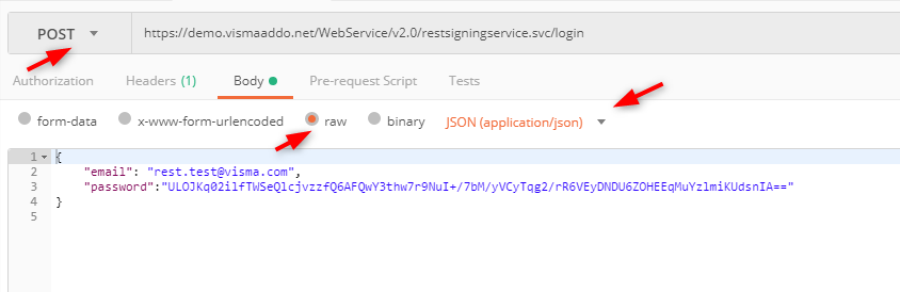 screenshot_05.png
(image/png) screenshot_07.png
(image/png)
screenshot_05.png
(image/png) screenshot_07.png
(image/png)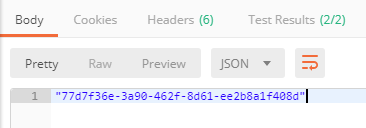 screenshot_08.png
(image/png)
screenshot_08.png
(image/png)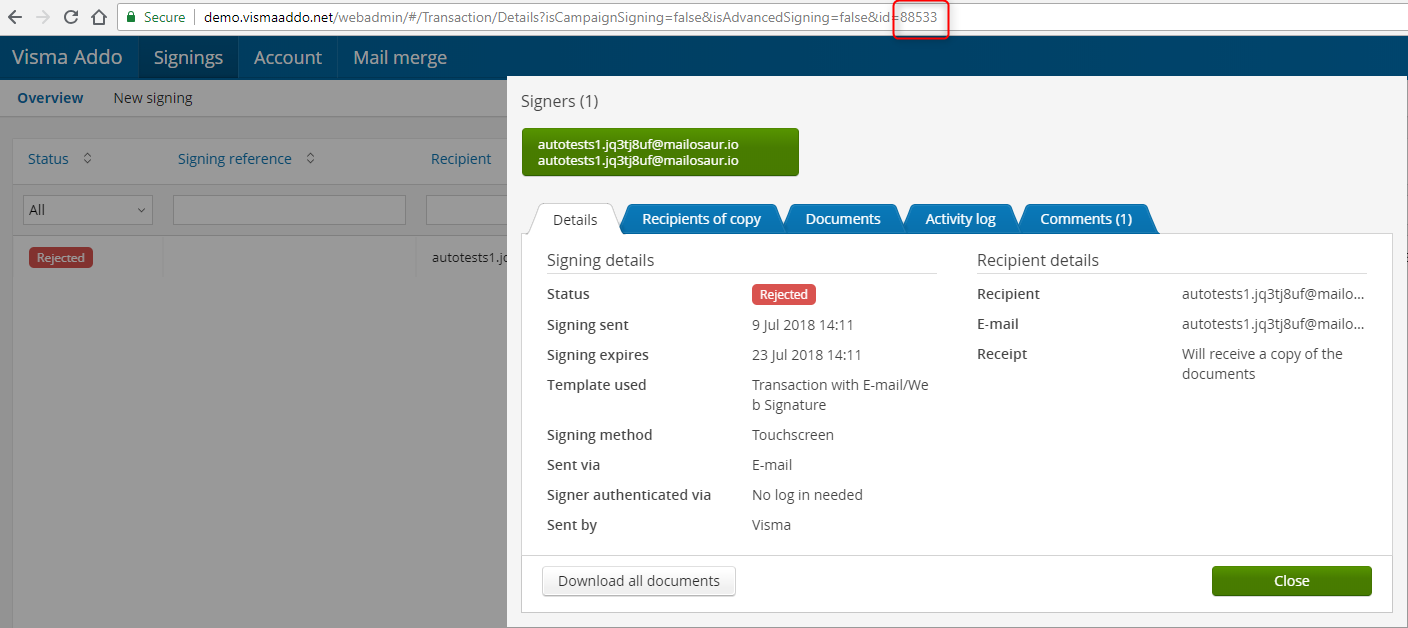 screenshot_09.png
(image/png)
screenshot_09.png
(image/png)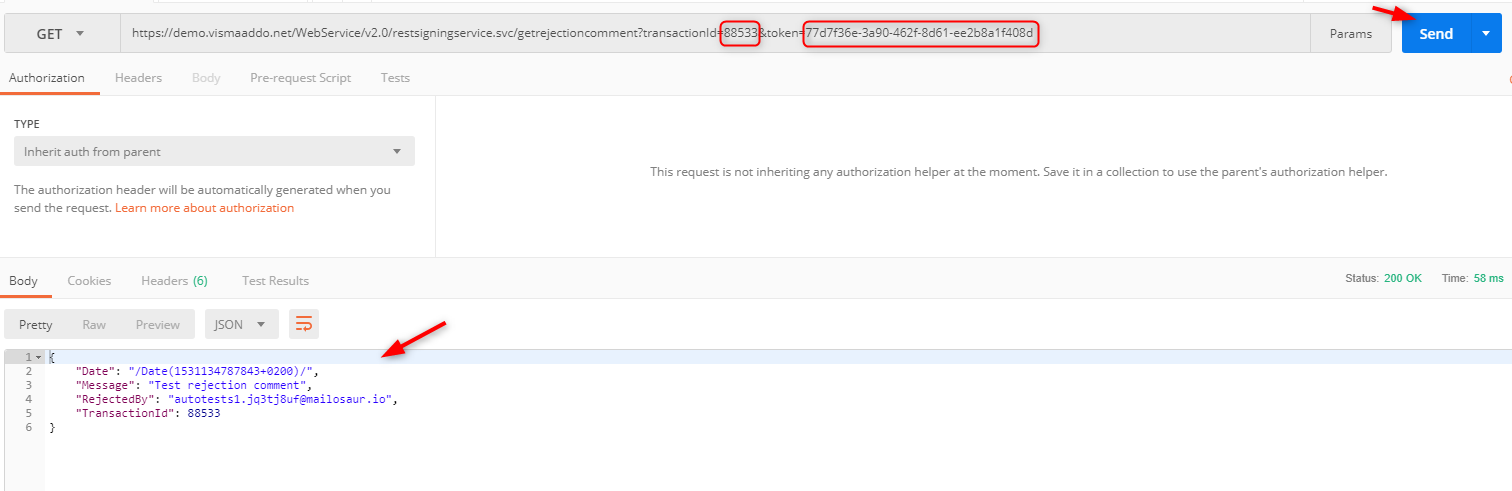 screenshot_09.png
(image/png)
screenshot_09.png
(image/png)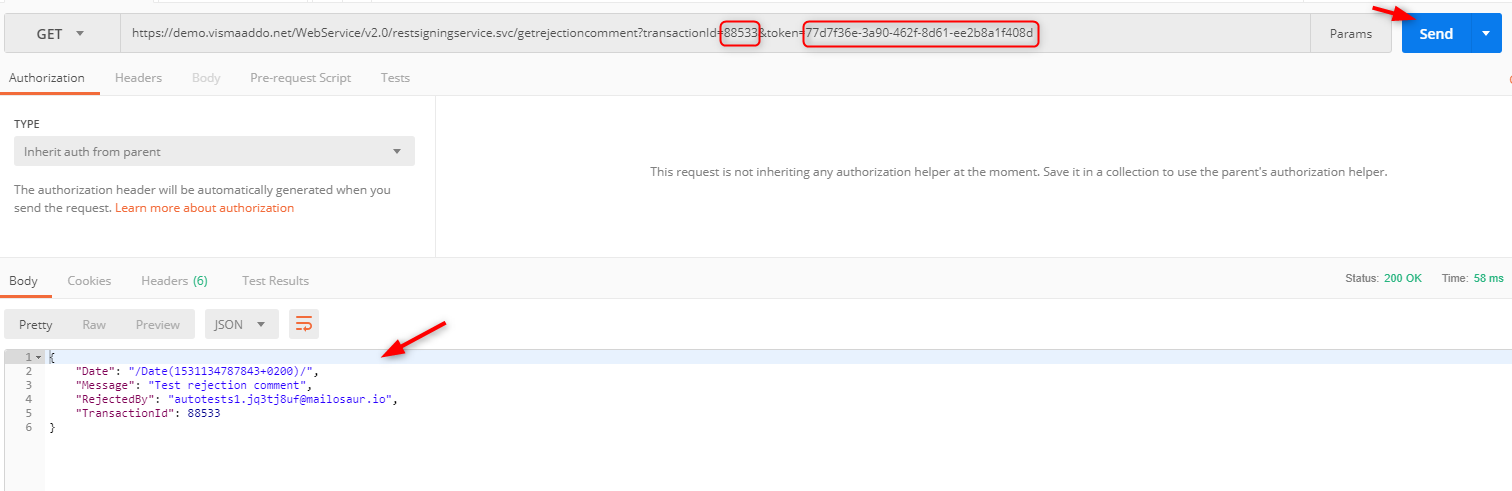 screenshot_04.png
(image/png) screenshot_12.png
(image/png) screenshot_14.png
(image/png) loginToken.PNG
(image/png) getRejectionComment.PNG
(image/png) image-2023-1-24_14-0-21.png
(image/png)
screenshot_04.png
(image/png) screenshot_12.png
(image/png) screenshot_14.png
(image/png) loginToken.PNG
(image/png) getRejectionComment.PNG
(image/png) image-2023-1-24_14-0-21.png
(image/png) image-2023-1-24_14-1-37.png
(image/png)
image-2023-1-24_14-1-37.png
(image/png)